ICMPipe
ICMP and the ICMPipe experiment
The Internet Control Message Protocol (ICMP) is best known for powering the ping command. It was designed for diagnostics and error reporting, not for general-purpose file transfer.
ICMPipe is a proof-of-concept that moves file contents through ICMP payload bytes by adding a lightweight application-layer protocol on top of standard ICMP echo request/reply traffic.
This article explains the protocol design, shows how the client/server exchange works, and highlights the practical limitations and improvement opportunities.
Protocol overview
ICMPipe uses four payload flags:
FR— File RequestFA— File AcknowledgmentFP— File PullFD— File Data
The protocol runs in two phases:
- Client sends
FR:<absolute path>to request a file. - Server replies with
FA:<file size>orFA:File Not Found. - Client sends
FP:<absolute path>to begin the transfer. - Server streams the file in
FD:<base64 chunk>payloads. - Client reassembles chunks until the total received size matches the acknowledged file size.
1
2
3
4
5
6
7
8
9
10
11
Phase 1: File discovery
Client -> Server: FR:<absolute_path>
Server -> Client: FA:<file_size> OR FA:File Not Found

Phase 2: File transfer
Client -> Server: FP:<absolute_path>
Server -> Client: FD:<base64_chunk>
Client -> Server: FD:<acknowledgment>
...
Terminate when received size >= file size
Reassemble payloads
Current implementation and limitations
The current ICMPipe implementation is intentionally simple. It demonstrates the concept, but it does not yet offer the reliability or robustness required for production-grade transfer.
Key limitations include:
- Loss recovery
- No retransmission for lost
FDpackets - No sequence numbers for out-of-order delivery
- No retransmission for lost
- Data integrity
- Only file size is validated
- No checksum, hash, or authentication
- Session recovery
- No resume for interrupted transfers
- Packet handling
- Assumes packets arrive in order
- Does not manage ICMP fragmentation or device filtering
- Performance
- Fixed payload chunk size
- No congestion or rate control
- External dependencies
- Relies heavily on the libpcap library for packet capture and injection
Enhancement opportunities
Recommended improvements:
- Add sequence numbers for every
FDchunk. - Add checksums or HMACs for chunk verification.
- Implement retransmission and timeout handling.
- Add resume support for interrupted transfers.
- Support adaptive chunk sizes and rate limiting.
- Add optional encryption or authentication for secure use.
- Remove the libpcap dependency by interacting directly with low-level system APIs (e.g., raw sockets or AF_PACKET) for better portability and control.
ICMPipe in action
Disclaimer: ICMPipe is provided for educational purposes only. Use it only on systems and networks you are authorized to test.
ICMPipe depends on standard ICMP echo request/reply behavior. If the network or host modifies ICMP handling, the code may need adjustment and a rebuild.
Source code, executables, and installation instructions are available in the GitHub repository.
Test lab workflow
A Linux-based client (172.16.2.11) requests a file from a Windows server (172.16.2.102). The experiment validates the FR/FA/FP/FD exchange, payload encoding, and packet-level behavior.
Running the ICMPipe server
For the initial test, only the Windows server executable is required.
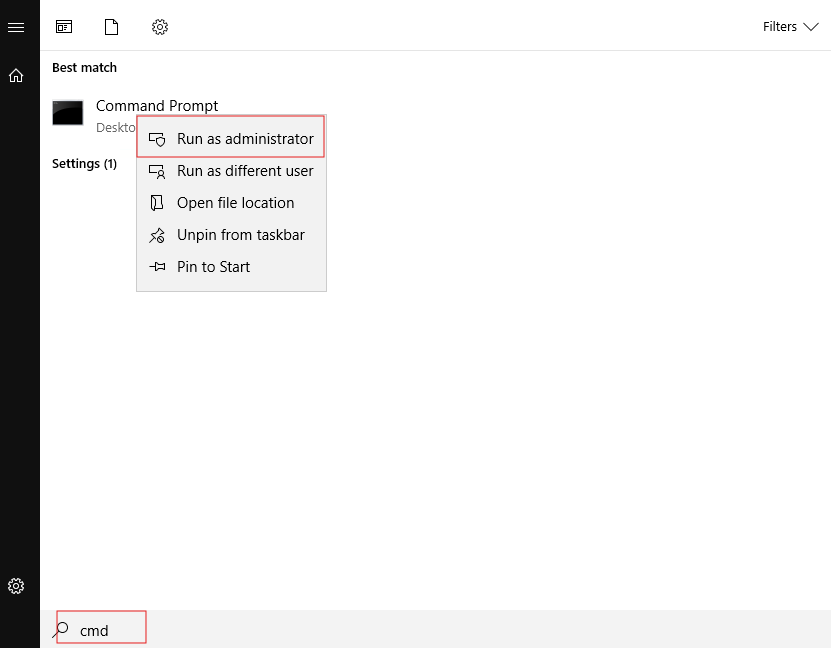
- Open Command Prompt as Administrator to allow raw ICMP operations.
- Download the server executable:
1
curl -L https://raw.githubusercontent.com/almontasercloud-collab/ICMPipe/main/server/ICMPipe-Server.exe -o ICMPipe-Server.exe

- Enumerate available adapters and supported flags:
1
ICMPipe-Server.exe
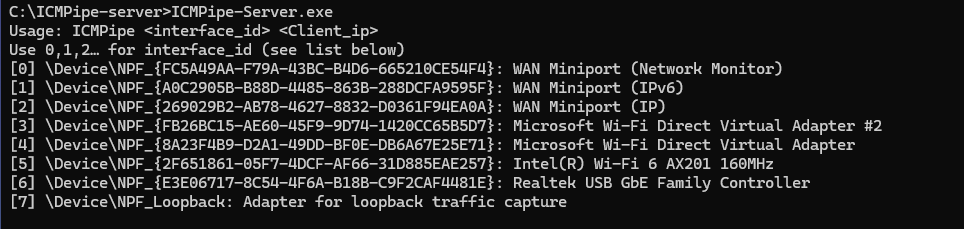
- Start the server on the desired interface and bind it to the client IP:
1
ICMPipe-Server.exe 3 172.16.2.11

The server is now ready to handle incoming file requests from the configured client.
Starting the ICMPipe client
- Download the client binary:
1
wget https://raw.githubusercontent.com/almontasercloud-collab/ICMPipe/main/client/ICMPipe-Client

- Make the binary executable:
1
sudo chmod 775 ./ICMPipe-Client

- Display client usage:
1
sudo ./ICMPipe-Client

Initiating a file request
The logs below show the full transfer lifecycle from initial file request through final reassembly. The client IP is 172.16.2.11 and the server IP is 172.16.2.102.
- Confirm the requested file exists on the server:
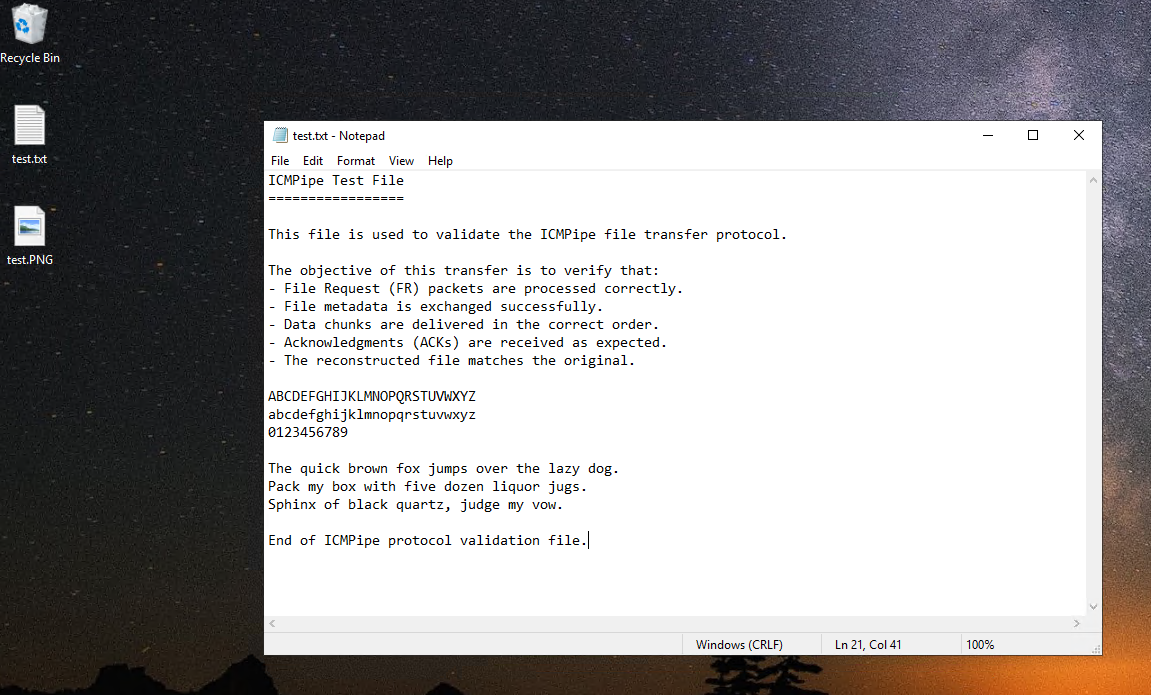
- Request
test.txtfrom the client:
1
sudo ./ICMPipe-Client -p "C:\Users\Administrator\Desktop\test.txt" -i "eth0" -ip 172.16.2.102 -O ./test.txt
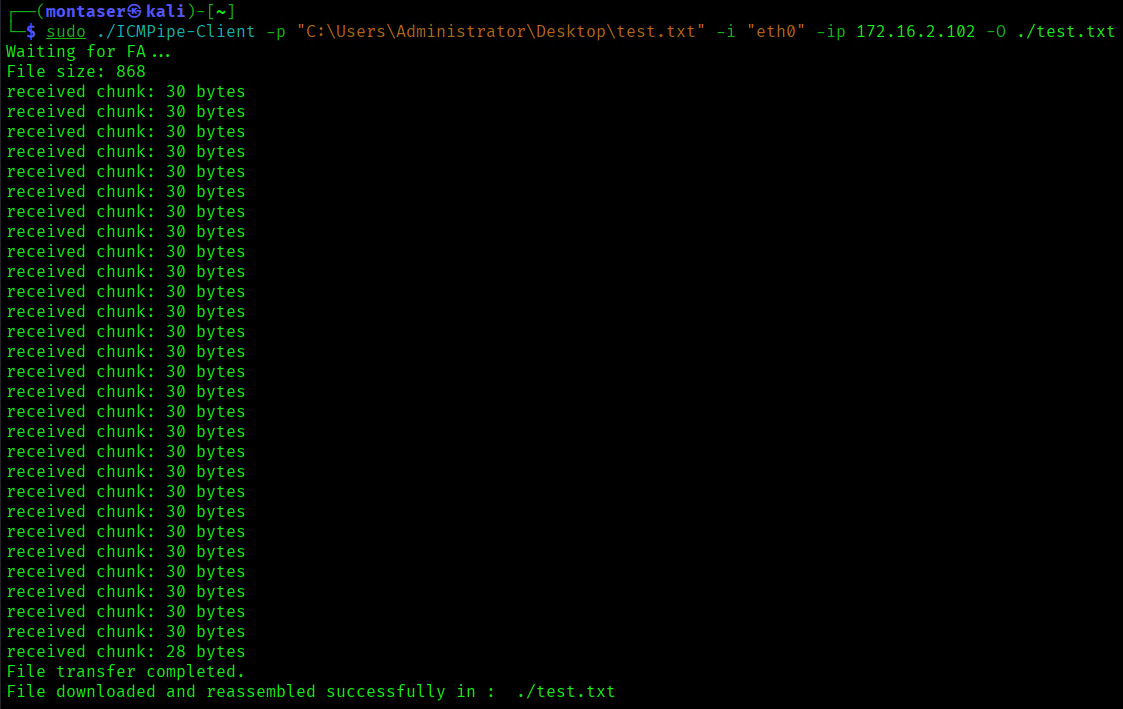
The message
File downloaded and reassembled successfully in : ./test.txtindicates that the transfer finished successfully.
- Verify the downloaded file:
1
cat ./test.txt
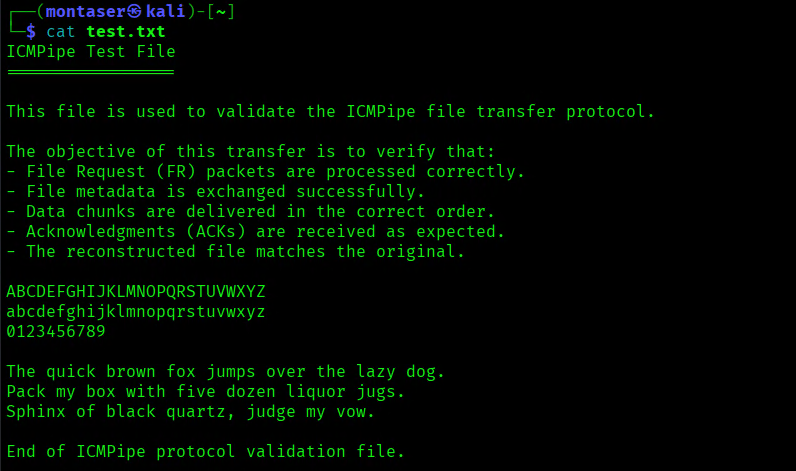
Successful reconstruction confirms the file was transferred and reassembled correctly.
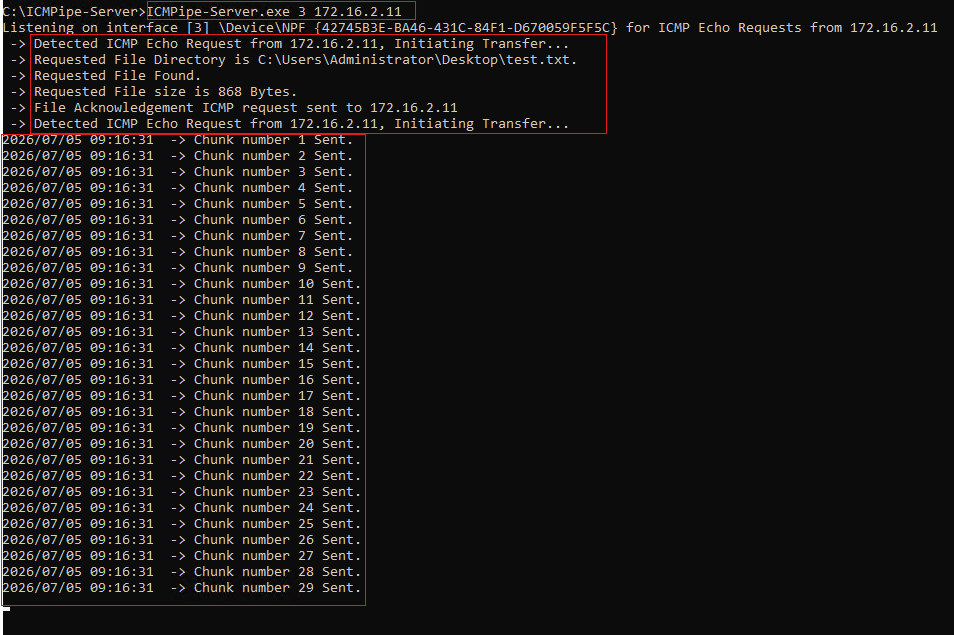
Server runtime logs
The server log output shows how the request is processed and how file chunks are dispatched.
Packet capture analysis
The packet capture confirms the protocol behavior on the wire, from the initial FR request through the stream of FD chunks.
File Request packet
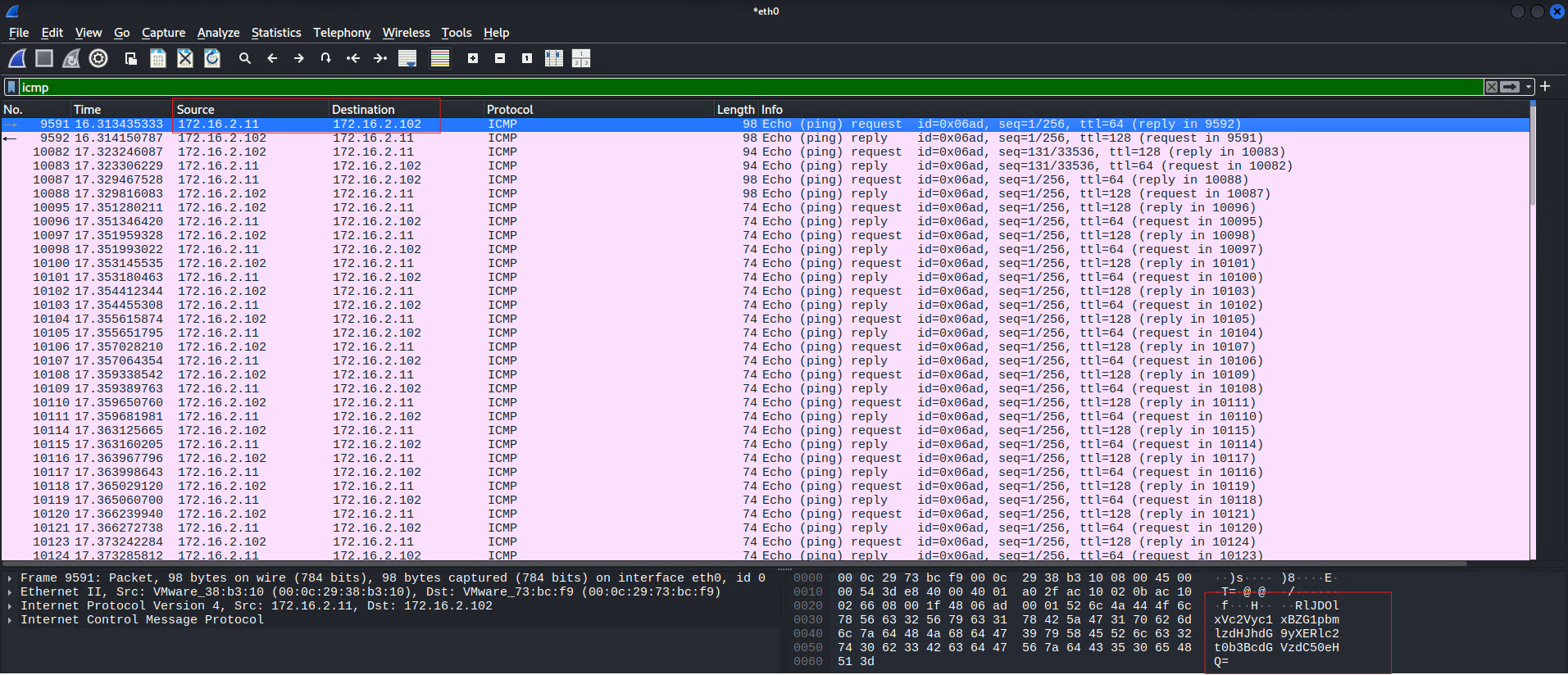
- Payload (Base64):
1
RlJDOlxVc2Vyc1xBZG1pbmlzdHJhdG9yXERlc2t0b3BcdGVzdC50eHQ=
- Decoded payload:
1
FRC:\Users\Administrator\Desktop\test.txt
The client sends
FRfollowed by the requested path to start the transfer.
File Acknowledgment packet
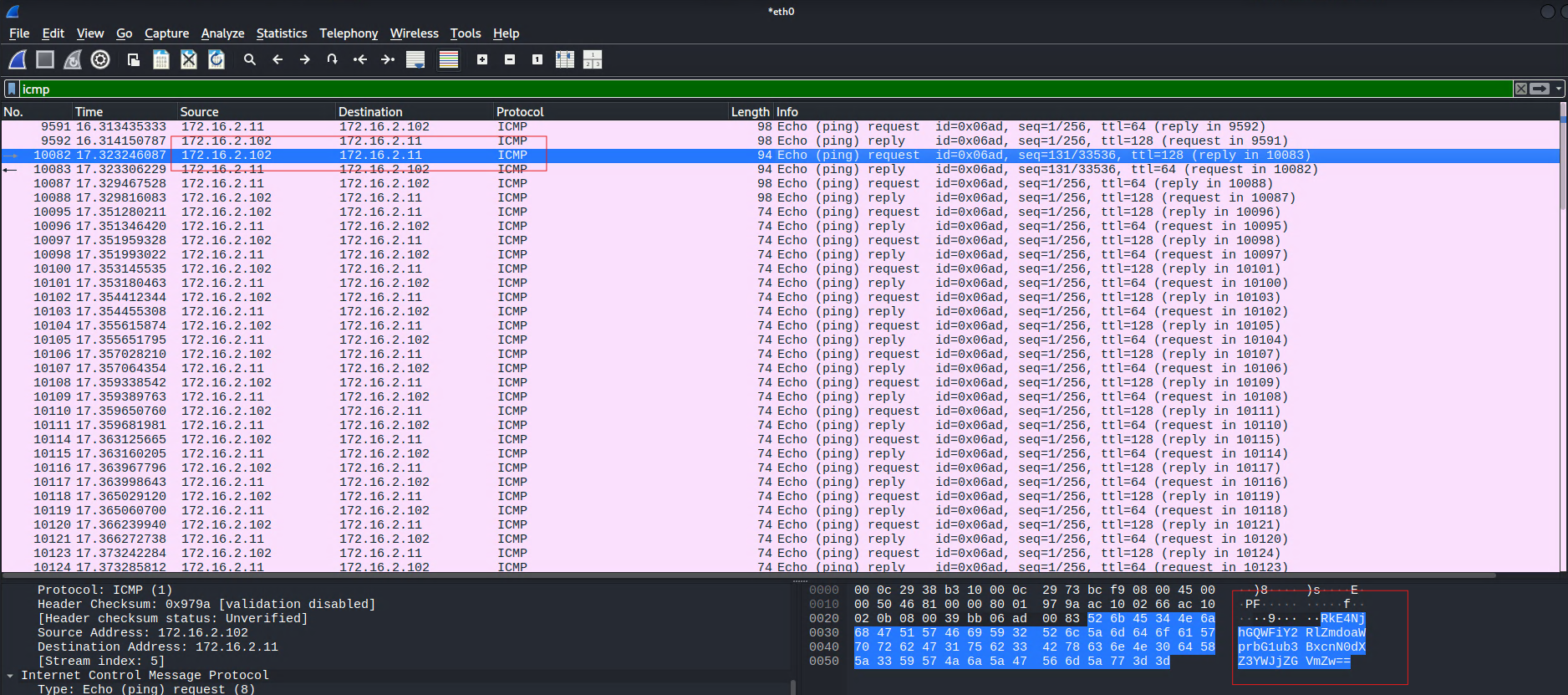
- Payload (Base64):
1
RkE4NjhGQWFiY2RlZmdoaWprbG1ub3BxcnN0dXZ3YWJjZGVmZw==
- Decoded payload:
1
FA868FAabcdefghijklmnopqrstuvwabcdefg
The server replies with
FA<size>FAand fills the remaining payload with default ICMP data.
File Pull packet
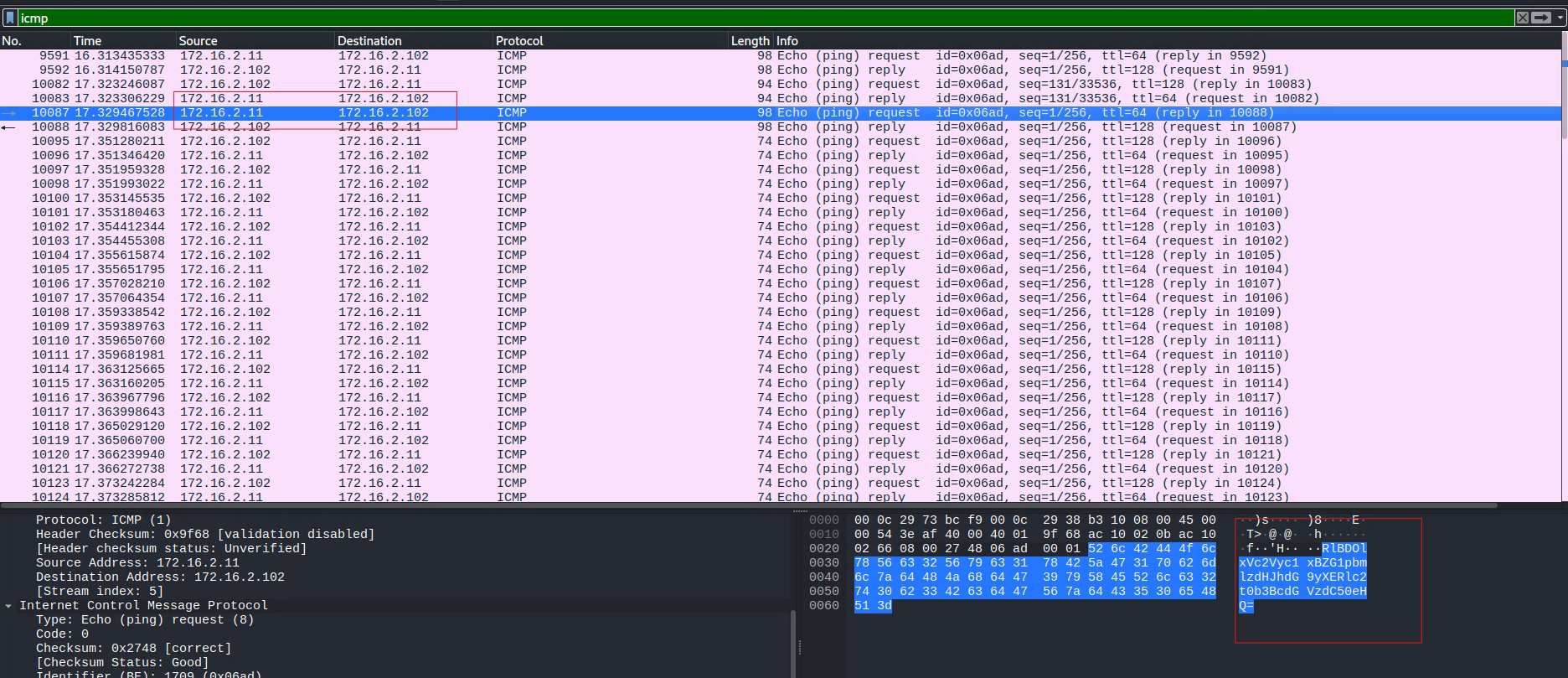
- Payload (Base64):
1
RlBDOlxVc2Vyc1xBZG1pbmlzdHJhdG9yXERlc2t0b3BcdGVzdC50eHQ=
- Decoded payload:
1
FPC:\Users\Administrator\Desktop\test.txt
The client sends
FPto tell the server to begin streaming the file.
Data chunk packets
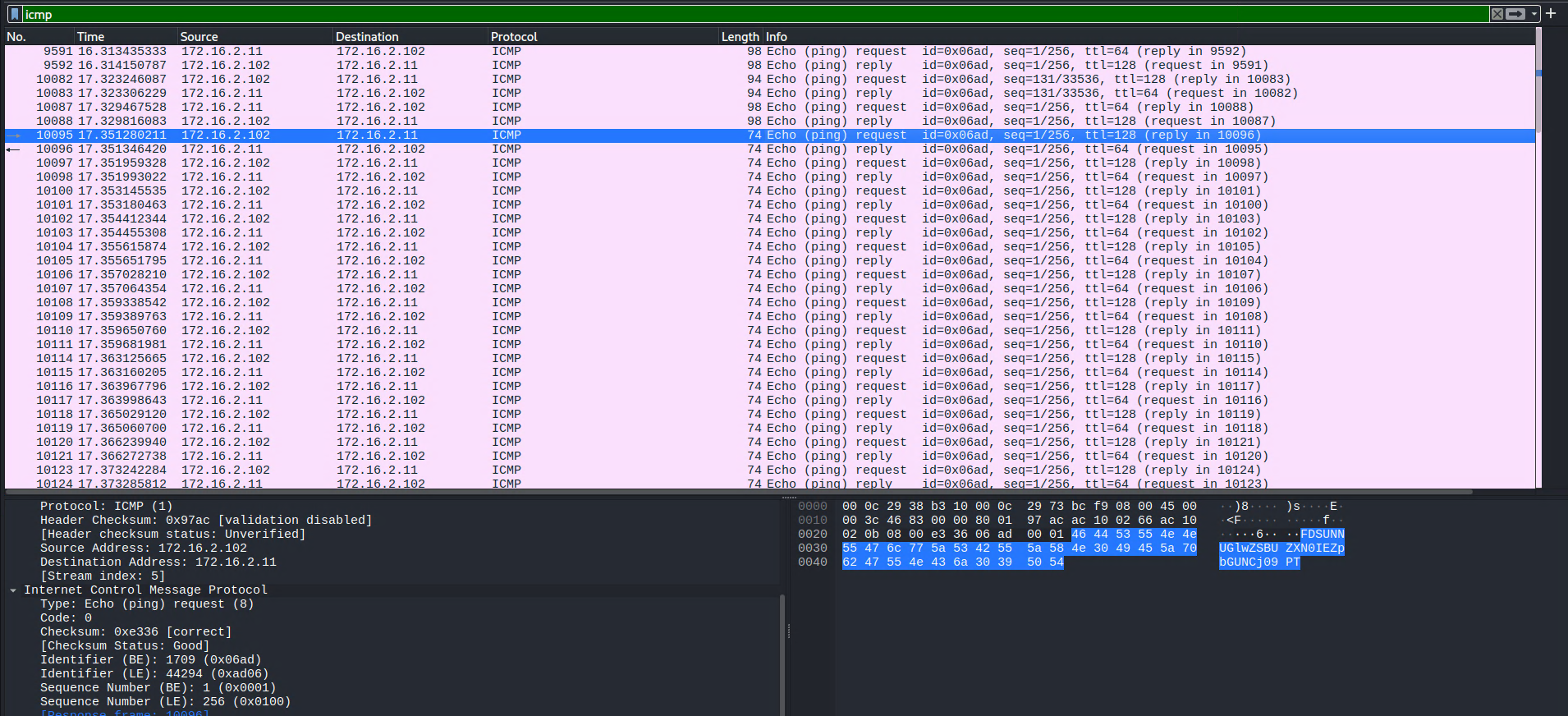
- Payload:
1
FDSUNNUGlwZSBUZXN0IEZpbGUNCj09PT
- Decoded payload after removing
FD:
1
2
ICMPipe Test File
===
The server sends Base64-encoded file chunks prefixed with
FD. The client decodes each chunk and assembles the file until transfer completion.
The current chunk size is fixed in the server source code and can be adjusted here:
1
2
3
4
5
6
7
8
9
const icmpPayloadSize = 32  // Payload size
const prefix = "FD"
const usableDataSize = icmpPayloadSize - len(prefix)
count := 0

for i := 0; i < len(encodedData); i += usableDataSize {
    end := i + usableDataSize
    ...
}
Conclusion
ICMPipe demonstrates a simple file transfer protocol built on ICMP echo messages. It shows how custom protocol logic can coordinate structured data exchange over a protocol originally designed for diagnostics.
The next steps should focus on removing the dependancy on libpcap and enhancing the protocol with mechanisms for reliable delivery, integrity verification, session recovery, adaptive payload sizing, and resilience to ICMP rate limiting and packet loss.