EAP-Chaining with TEAP
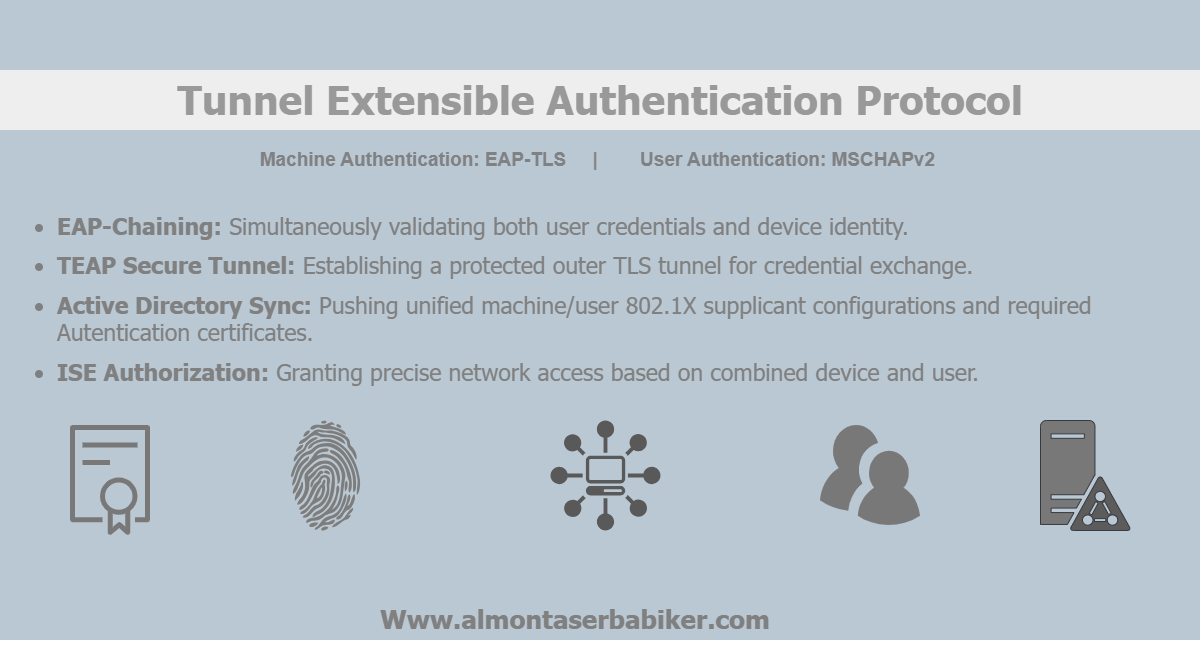
The PEAP authentication method discussed previously relies on Machine Access Restriction (MAR) in Cisco ISE to associate machine and user authentication. Although this approach allows a domain-joined endpoint to authenticate the machine before the user, the previous lab PEAP & EAP-TLS demonstrated that MAR introduces limitations and additional considerations when maintaining the relationship between the two authentication events.
TEAP (Tunnelled Extensible Authentication Protocol) provides a different approach by establishing a single protected TLS tunnel in which multiple authentication methods can be performed. This allows machine and user authentication to take place within the same TEAP session without relying on MAR to associate separate authentication events.
The Active Directory configuration and the basic ISE configuration related to certificates, trusted CAs, and EAP-TLS are identical to those covered in the previous PEAP & EAP-TLS article. These steps are therefore not repeated, with the focus instead placed on the TEAP-specific configuration and authentication process.
This article configures TEAP to authenticate the machine using EAP-TLS and the user using MSCHAPv2. The resulting authentication flow demonstrates how Cisco ISE processes multiple inner methods within a single TEAP session and how the machine and user identities are handled during authentication and authorization. The article also examines how this approach differs from the PEAP and MAR-based model, particularly in the way machine and user authentication are carried out and associated within the same protected authentication session.
TEAP Overview
TEAP (Tunnelled Extensible Authentication Protocol) extends the EAP framework by establishing a protected TLS tunnel capable of carrying multiple authentication exchanges within a single session. Unlike PEAP, where a single inner authentication method is typically used within the TLS tunnel, TEAP supports multiple inner methods, making it possible to perform machine and user authentication as part of the same authentication process.
In this lab, TEAP is used with EAP-TLS for machine authentication and MSCHAPv2 for user authentication. This combination demonstrates how different authentication methods can coexist within the same TEAP tunnel and how Cisco ISE processes the resulting identities.
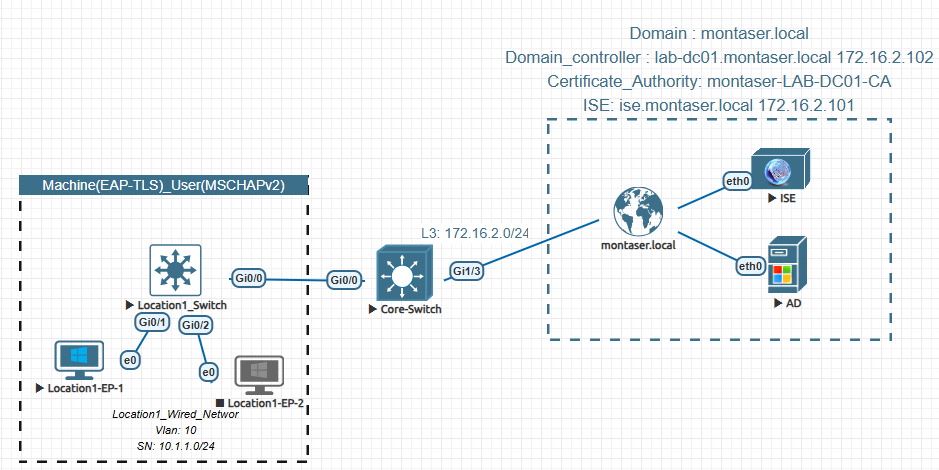
Lab Topology and Authentication Flow
The lab environment uses the same core network components and Active Directory infrastructure established in the previous 802.1X and EAP-TLS labs. The endpoint is a Windows 11 domain-joined workstation, while Cisco ISE provides the authentication and authorization services through RADIUS.
The authentication flow consists of two distinct authentication stages within the TEAP session. The machine first authenticates using EAP-TLS, followed by user authentication using MSCHAPv2. This sequence allows the authentication and authorization results associated with the machine and user identities to be examined separately.
Configuring TEAP Supplicant
With the underlying Active Directory, certificate, and EAP-TLS configuration already established in the previous articles, only the TEAP-specific configuration is required for this implementation. It is also important to highlight the Windows native supplicant configuration for TEAP, which can either be deployed through Active Directory Group Policy or configured locally on the endpoint. In this lab, Active Directory Group Policy is used to centrally deploy the required TEAP supplicant configuration to the Windows endpoint.
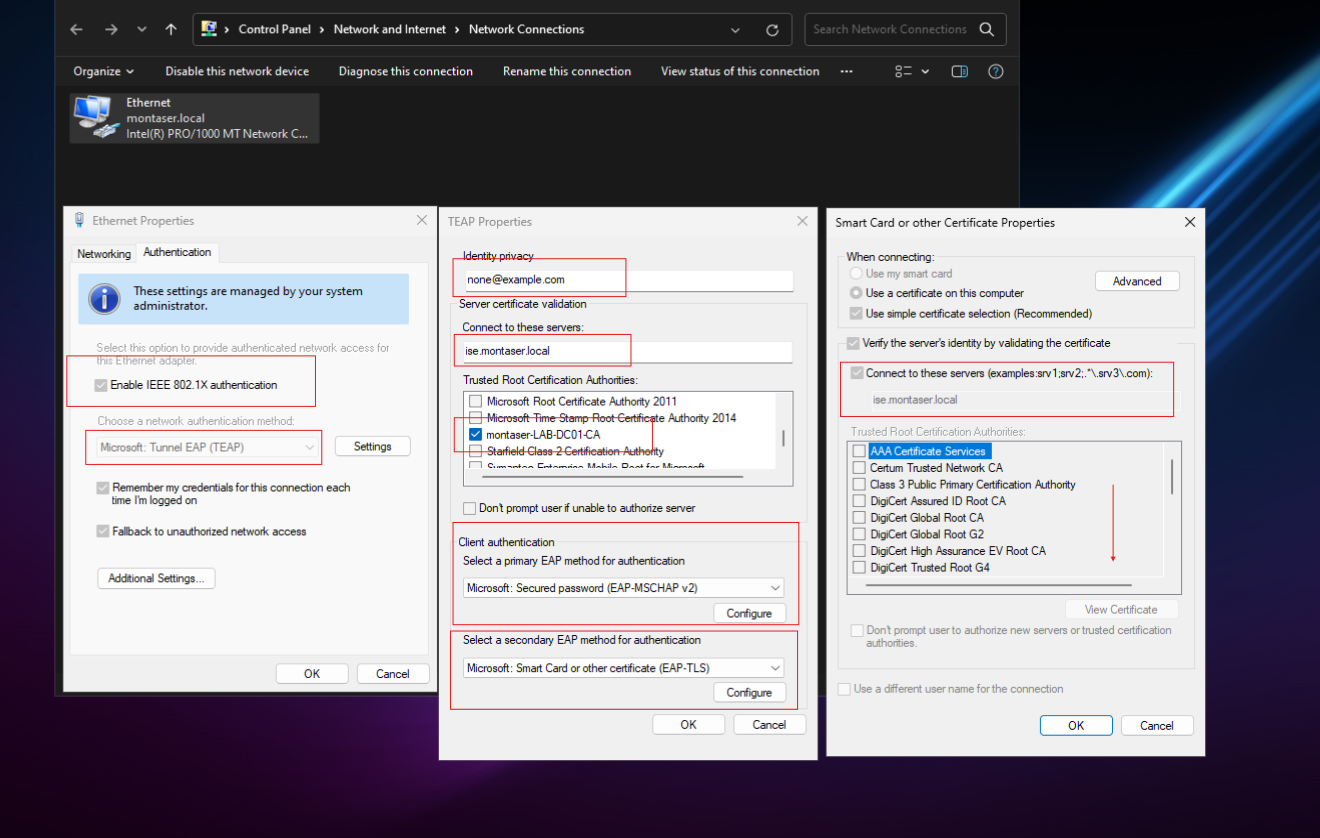
Note: Refer to PEAP & EAP-TLS GPOs section to get an overview of how certificates are issued for client machines
Configuring TEAP on Cisco ISE
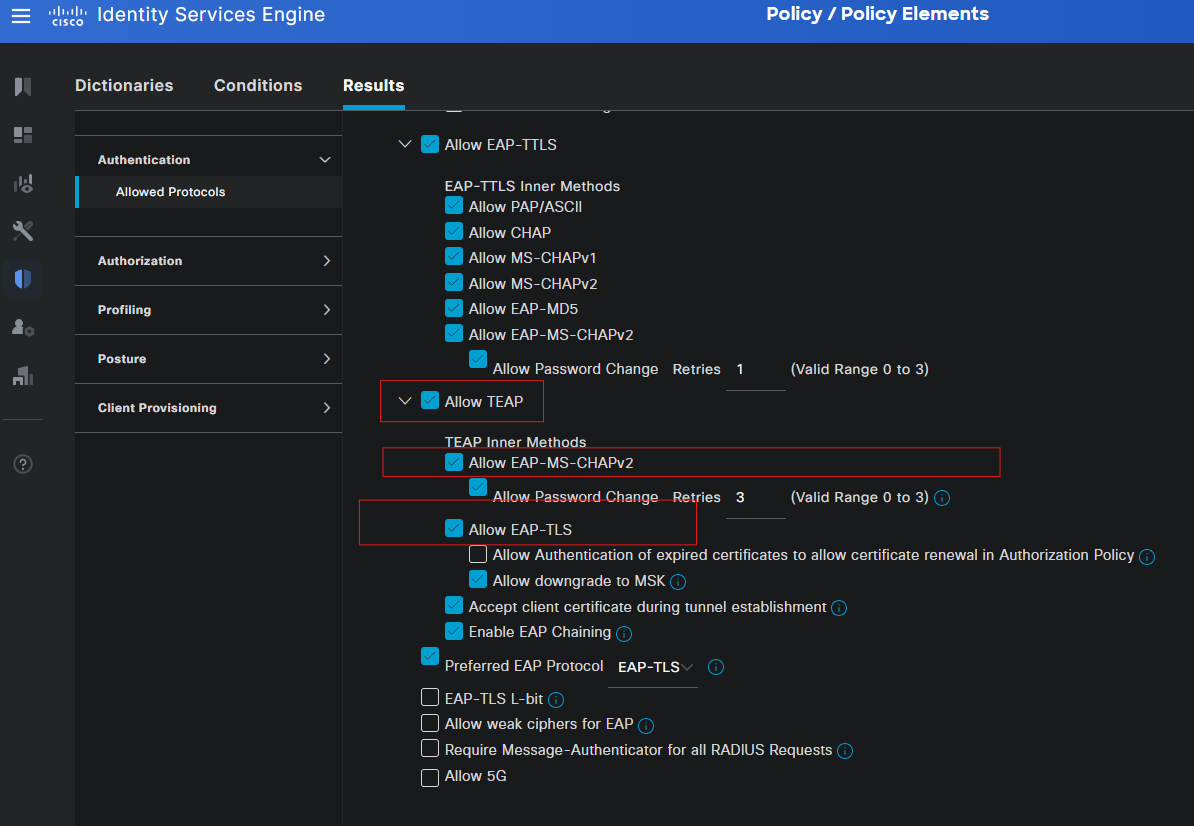
Cisco ISE configuration begins by defining the allowed EAP methods and establishing the TEAP settings required to support both the outer TLS tunnel and the inner authentication methods. The resulting configuration determines which authentication methods Cisco ISE can process during the TEAP exchange.
To enable TEAP in Cisco ISE, navigate to Administration > System > Settings > Protocols > EAP-TEAP and enable Allow TEAP
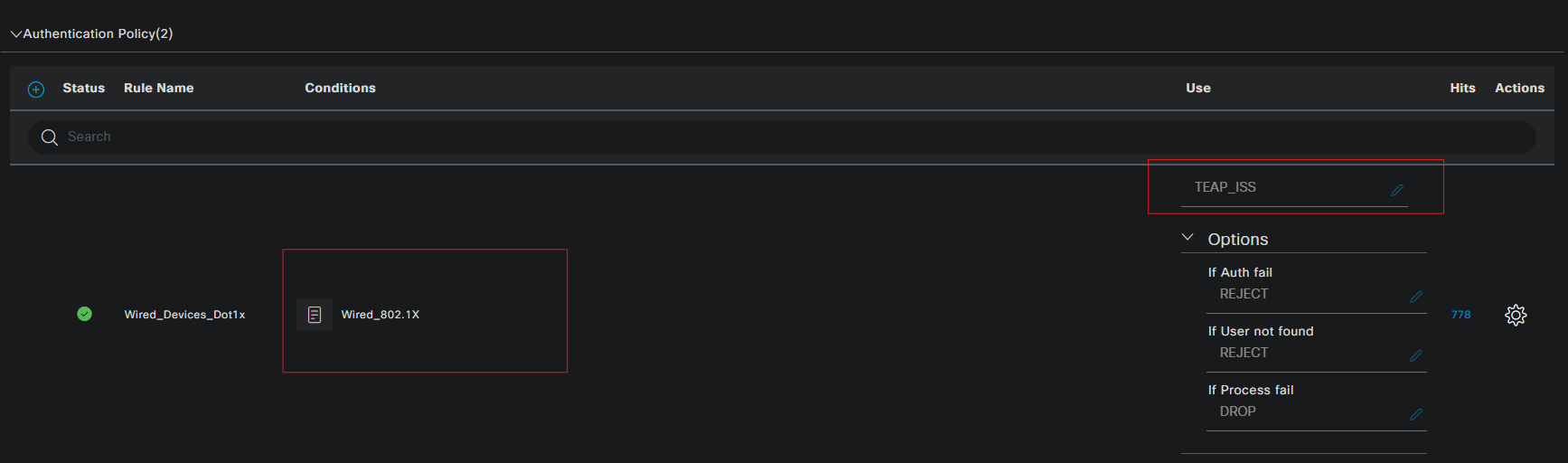
Configuring the TEAP Authentication Policy
The authentication policy determines how Cisco ISE processes the authentication requests received from the endpoint and which authentication method is applied at each stage of the TEAP exchange.
For this implementation, EAP-TLS is used for machine authentication, while MSCHAPv2 is used for user authentication. The policy configuration therefore needs to accommodate both authentication methods and the corresponding identity sources required to validate the machine certificate and user credentials.
Configuring the TEAP Authorization Policy
Once authentication has been successfully completed, Cisco ISE evaluates the resulting identities against the authorization policy. The policy determines the network access assigned to the authenticated endpoint based on attributes such as the authenticated identity and its associated Active Directory group.
The authorization configuration also demonstrates how the machine and user authentication results produced by the TEAP session can be used when determining the appropriate level of network access.
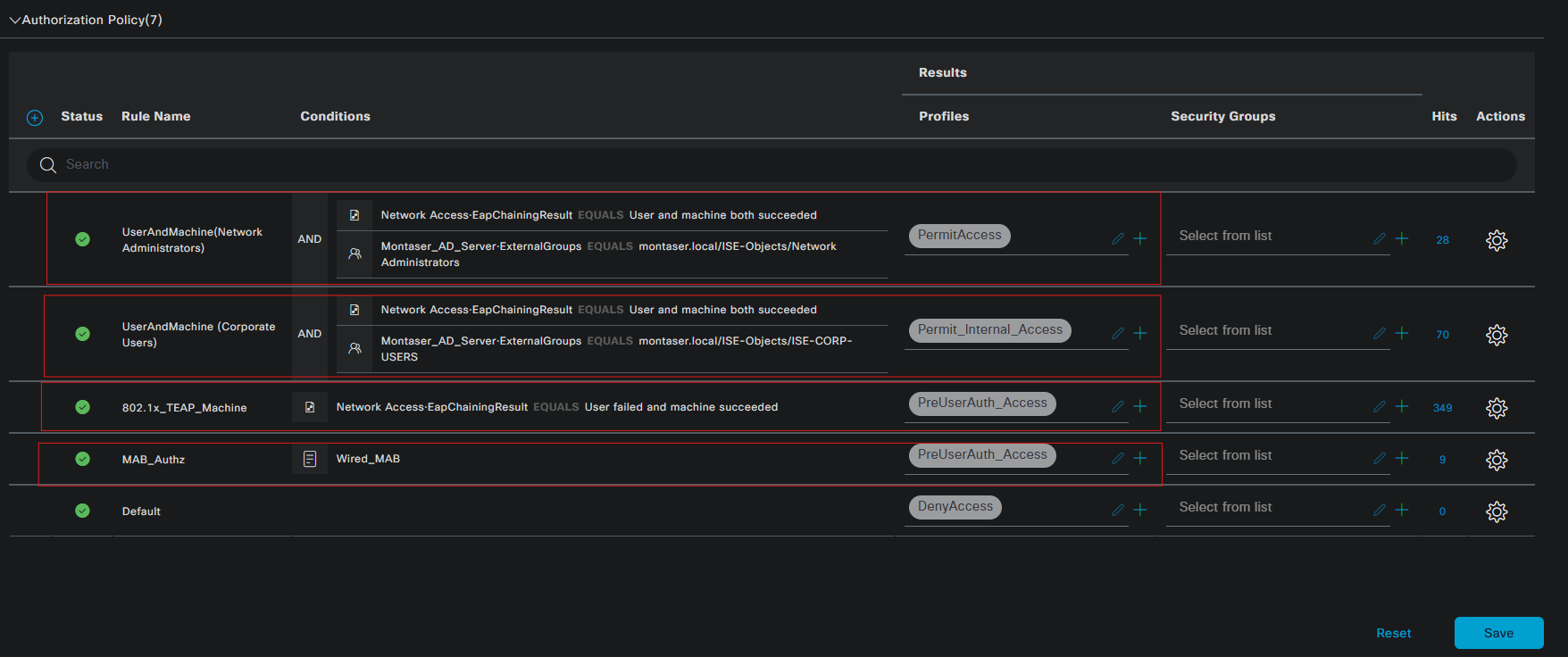
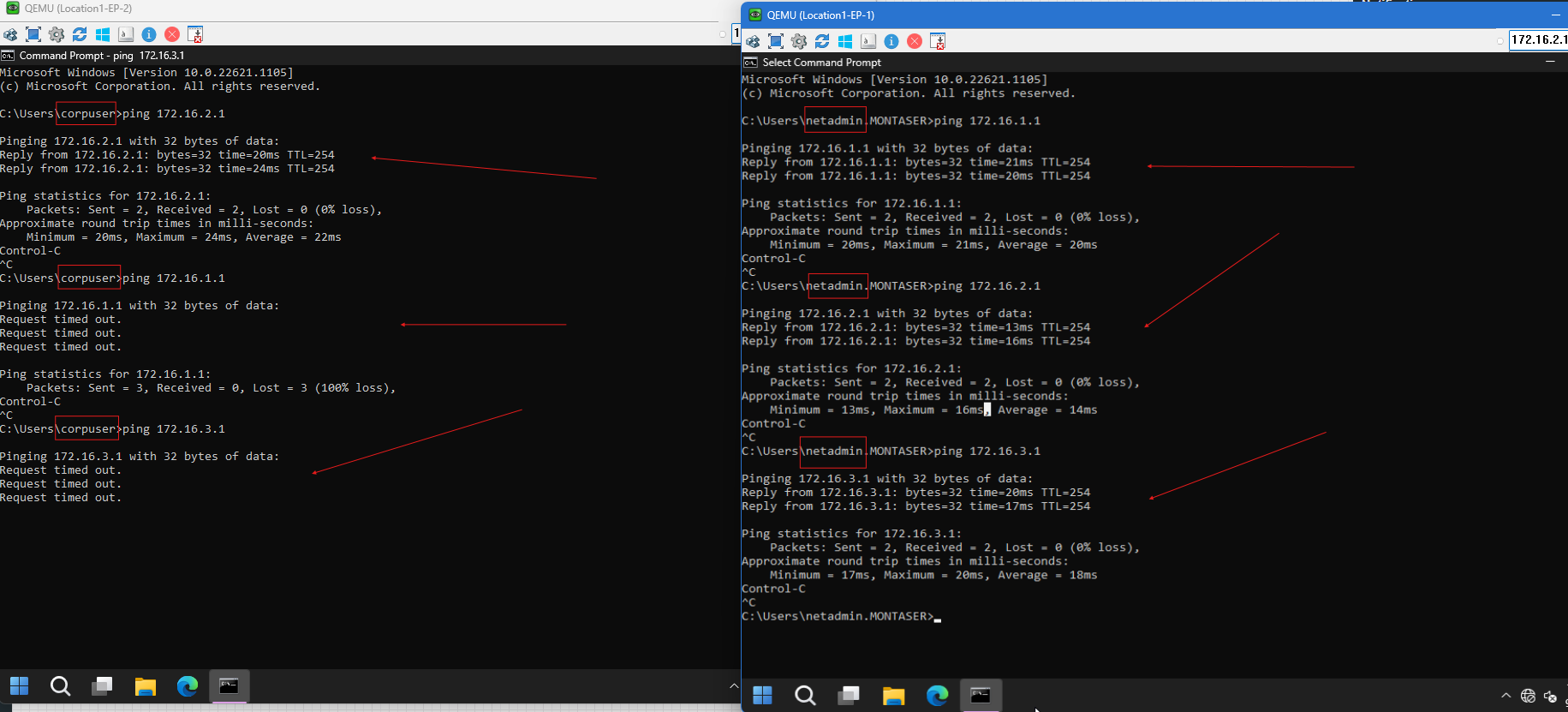
The authorization policy shown above evaluates the authentication results from top to bottom. The UserAndMachine (Network Administrators) rule provides full network access to authenticated users belonging to the Network Administrators group when both the user and machine have successfully authenticated. The UserAndMachine (Corporate Users) rule applies Permit_Internal_Access to authenticated Corporate Users, restricting their access to the 172.16.2.0/24 subnet. When only machine authentication has been completed, the 802.1x_TEAP_Machine rule applies PreUserAuth_Access, allowing the machine to access the required services such as DNS and DHCP before user authentication. The MAB_Authz rule provides the same PreUserAuth_Access profile for endpoints authenticated through MAB. Any request that does not match the preceding rules is handled by the Default rule and denied access.
Authentication and Authorization Testing
The completed configuration is validated through a sequence of authentication tests from the Windows 11 endpoint. The testing focuses on both stages of the TEAP exchange, beginning with machine authentication using EAP-TLS and continuing with user authentication using MSCHAPv2.
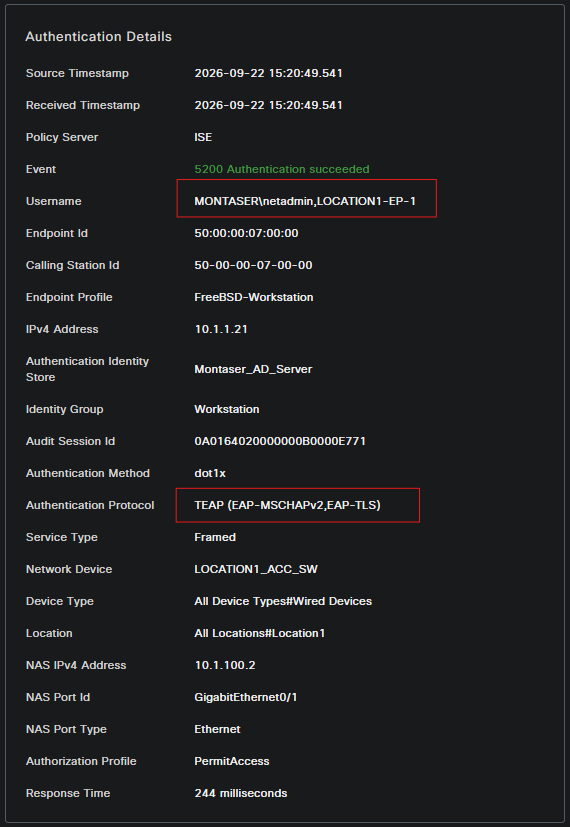
Cisco ISE authentication logs are examined to verify the individual authentication stages, the identities returned by each method, and the authorization result applied after successful authentication.
Endpoints Startup:
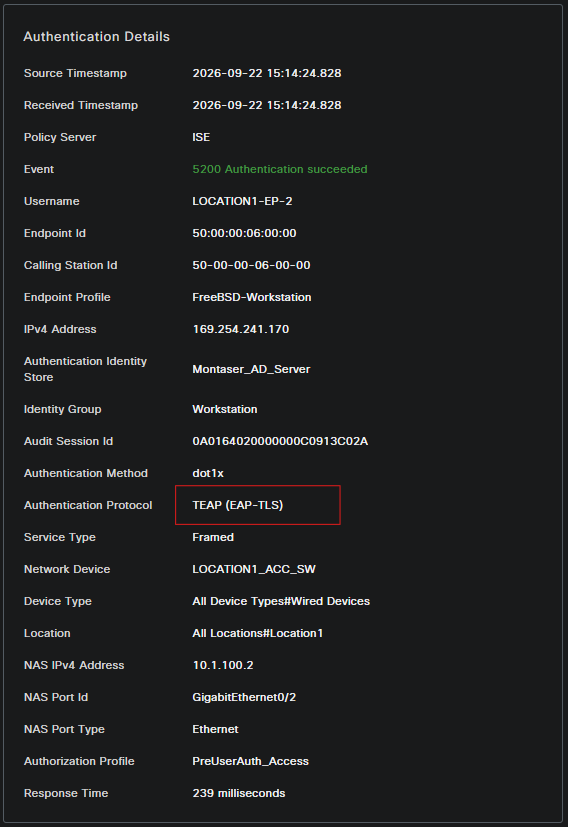
Two Windows 11 endpoints are powered on to initiate the TEAP authentication process. Before any user logs in, the Cisco ISE authentication logs are examined to verify successful machine authentication and confirm that the PreUserAuth_Access authorization profile is applied.

1
2
3
4
5
6
7
8
9
10
11
12
13
14
15
16
17
18
Interface    Identifier     Method  Domain  Status Fg Session ID
Gi0/2        5000.0006.0000 dot1x   DATA    Auth      0A0164020000000C0913C02A
Gi0/1        5000.0007.0000 dot1x   DATA    Auth      0A0164020000000B0000E771

Session count = 2

Key to Session Events Blocked Status Flags:

  A - Applying Policy (multi-line status for details)
  D - Awaiting Deletion
  F - Final Removal in progress
  I - Awaiting IIF ID allocation
  N - Waiting for AAA to come up
  P - Pushed Session
  R - Removing User Profile (multi-line status for details)
  U - Applying User Profile (multi-line status for details)
  X - Unknown Blocker
1
2
3
4
5
6
7
8
9
10
11
12
13
14
15
16
17
18
19
20
21
22
23
24
25
26
27
28
29
30
31
32
33
34
Location-1-ACC-Switch#show authentication sess int g0/1 det
            Interface:  GigabitEthernet0/1
          MAC Address:  5000.0007.0000
         IPv6 Address:  Unknown
         IPv4 Address:  10.1.1.21
            User-Name:  LOCATION1-EP-1
               Status:  Authorized
               Domain:  DATA
       Oper host mode:  multi-host
     Oper control dir:  both
      Session timeout:  3600s (local), Remaining: 3430s
       Timeout action:  Reauthenticate
      Restart timeout:  N/A
Periodic Acct timeout:  N/A
       Session Uptime:  2715s
    Common Session ID:  0A0164020000000B0000E771
      Acct Session ID:  Unknown
               Handle:  0xD9000001
       Current Policy:  POLICY_Gi0/1

Local Policies:
        Service Template: DEFAULT_LINKSEC_POLICY_SHOULD_SECURE (priority 150)
      Security Policy:  Should Secure
      Security Status:  Link Unsecure


Server Policies:
              ACS ACL:  xACSACLx-IP-PERMIT_AD_Service-6aab39a4

Method status list:
      Method            State

      dot1x              Authc Success
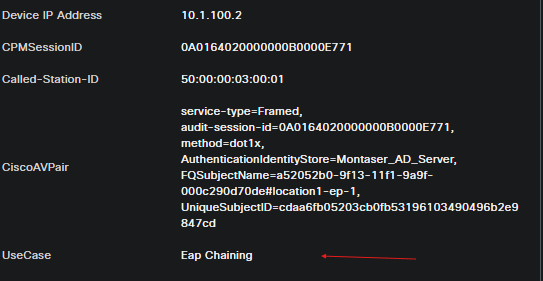
The endpoints are then accessed using a Network Administrator account (netadmin) on one endpoint and a Corporate User account (corpuser) on the other to validate user authentication and verify the corresponding authorization and network access results

1
2
3
4
5
6
7
8
9
10
11
12
13
14
15
16
17
18
19
20
21
22
23
24
25
26
27
28
29
30
31
32
33
Location-1-ACC-Switch#show authentication sess int g0/1 det
            Interface:  GigabitEthernet0/1
          MAC Address:  5000.0007.0000
         IPv6 Address:  Unknown
         IPv4 Address:  10.1.1.21
            User-Name:  MONTASER\netadmin
               Status:  Authorized
               Domain:  DATA
       Oper host mode:  multi-host
     Oper control dir:  both
      Session timeout:  3600s (local), Remaining: 3412s
       Timeout action:  Reauthenticate
      Restart timeout:  N/A
Periodic Acct timeout:  N/A
       Session Uptime:  3100s
    Common Session ID:  0A0164020000000B0000E771
      Acct Session ID:  Unknown
               Handle:  0xD9000001
       Current Policy:  POLICY_Gi0/1

Local Policies:
        Service Template: DEFAULT_LINKSEC_POLICY_SHOULD_SECURE (priority 150)
      Security Policy:  Should Secure
      Security Status:  Link Unsecure


Server Policies:

Method status list:
      Method            State

      dot1x              Authc Success
Conclusion
TEAP provides a mechanism for combining multiple authentication methods within a single protected TLS session, allowing machine and user authentication to be performed using different EAP methods. In this implementation, EAP-TLS provides certificate-based machine authentication, while MSCHAPv2 handles user authentication within the same TEAP session.
This approach removes the dependency on MAR for associating separate machine and user authentication events, while also allowing certificate-based authentication to be used for the machine without requiring certificate-based user authentication.