PEAP & EAP-TLS — Machine and User AAA
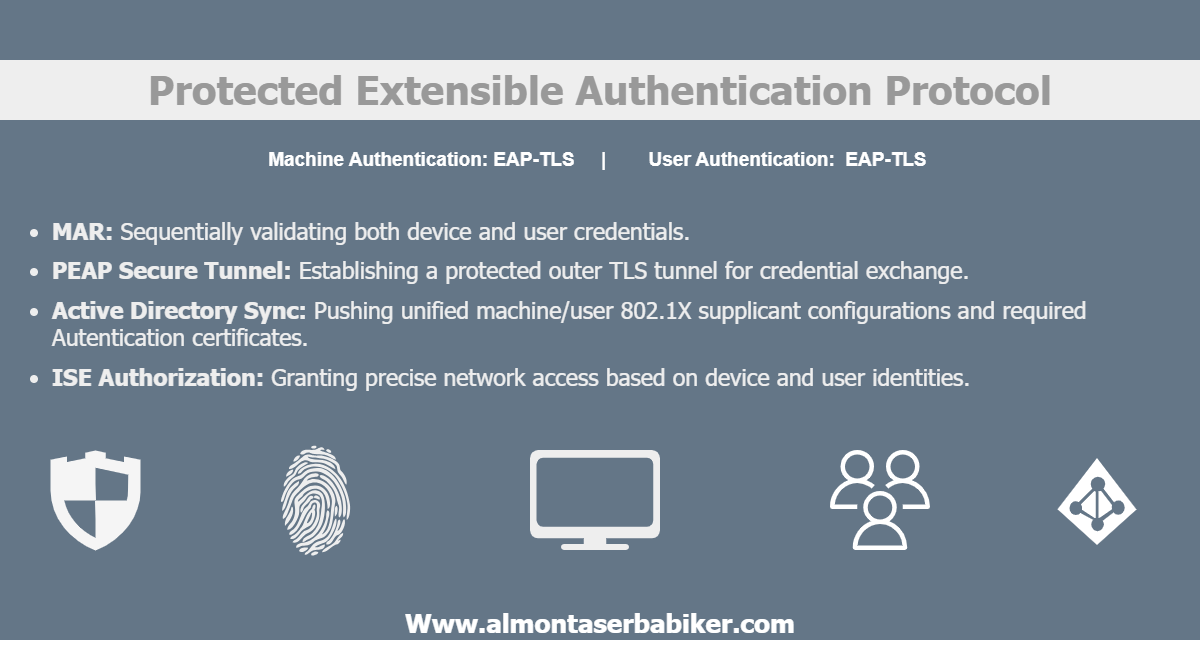
As the previous PEAP & MSCHAPv2 — Machine and User AAA lab article concluded, username and password authentication is not the most secure way to authenticate users or machines, especially given the common vulnerabilities inherent in credential-based methods. To address these persistent security gaps, this article explores a significantly more robust alternative: PEAP with EAP-TLS.
By combining the encrypted tunneling of Protected Extensible Authentication Protocol (PEAP) with the rigorous, certificate-based mutual authentication of Extensible Authentication Protocol-Transport Layer Security (EAP-TLS), organizations can eliminate password-based vectors entirely. you will dive into how this architecture functions, why it mitigates traditional credential risks, and the practical steps required for its deployment.
Protocols and Protocols!
Before jumping into the configuration, review the protocols defined under PEAP & MSCHAPv2 lab article. The same exact set of protocols will be used in this lab while replacing MSCHAPv2 with to EAP-TLS as the inner method for PEAP.
EAP-TLS (Extensible Authentication Protocol-Transport Layer Security): is a high-security network access method that uses digital certificates on both the client device and the authentication server to verify identities instead of relying on traditional usernames and passwords.
EAP-TLS Features:
- Mutual Certificate Authentication: Eliminates passwords entirely by requiring cryptographic digital certificates on both the client device and the server to verify identities.
- Cryptographic Handshake: Uses standard TLS protocols to negotiate cipher suites and verify private key ownership.
- Dynamic Key Generation: Automatically generates a unique Master Session Key (MSK) for every session, creating individual WPA2/WPA3 encryption keys to protect all subsequent network traffic.
- Immunity to Credential Theft: Completely prevents brute-force, dictionary, and phishing attacks because network access relies strictly on non-shareable, machine-bound cryptographic keys rather than human-inputted text.
Topology Diagram
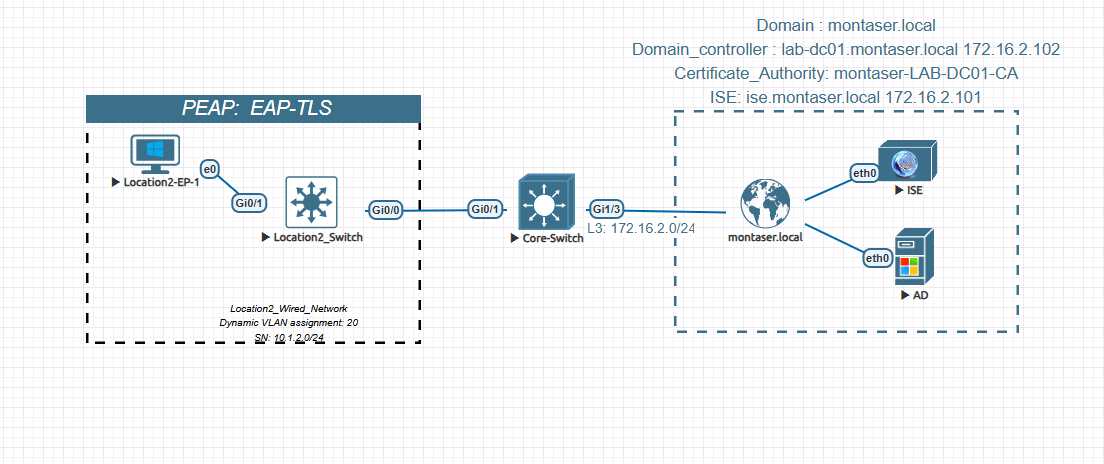
Before walking through the authentication flow, let’s establish the lab environment. The topology is intentionally simple: a single endpoint connecting through a Layer 2 access switch, which uplinks to a core switch and then to the identity and directory services.
Key Roles
-
Location2-EP-1: (supplicant) As shown in the diagram, Location2-EP-1 plays the supplicant role. The endpoint is joined to the
montaser.localActive Directory domain, and its supplicant configuration—including the PEAP/MSCHAPv2 settings, trusted CA, and authentication mode—is pushed automatically through a Group Policy Object (GPO). -
Location2_Switch: (Authenticator) The access port
Gi0/1connects to the endpoint, while the uplinkGi0/0connects to Core-Switch. The switch runs an authentication order of dot1x mab, meaning dot1x is attempted first. It forwards RADIUS requests to ISE and applies the authorization result, including any VLAN assignment returned by ISE. -
Core-Switch: (Transit) The Core-Switch provides the Layer 3 path between the access switch and ISE. It simply routes the RADIUS traffic between them; no authentication or authorization decisions are made here.
-
ISE: (RADIUS / Policy) ISE acts as the RADIUS server and policy engine. It identifies the endpoint, and returns the initial authorization result. Later, when the endpoint authenticates using PEAP, ISE handles the authentication process, validates the MSCHAPv2 credentials against Active Directory, and returns the appropriate authorization result.
This article assumes that Cisco ISE is already joined to the
montaser.localActive Directory domain.
- AD: (Identity Store) Active Directory stores the user accounts used to authenticate inside the PEAP tunnel. It also hosts the internal Certificate Authority (CA), which issued the EAP certificate used by ISE.
Configure the Supplicant (Location2-EP-1)
Basically, Location2-EP-1 is a Windows 11 workstation joined to the montaser.local Active Directory domain.
For convenience, you can push the supplicant service, network profile configuration, and the certificates required for EAP-TLS from the domain controller using Group Policy Objects (GPOs). This keeps the lab close to how things are handled in real deployments, where you may have tens or hundreds of workstations to configure.
First, verify that the workstation is properly joined to the Active Directory domain. Navigate to Control Panel > System and Security > System
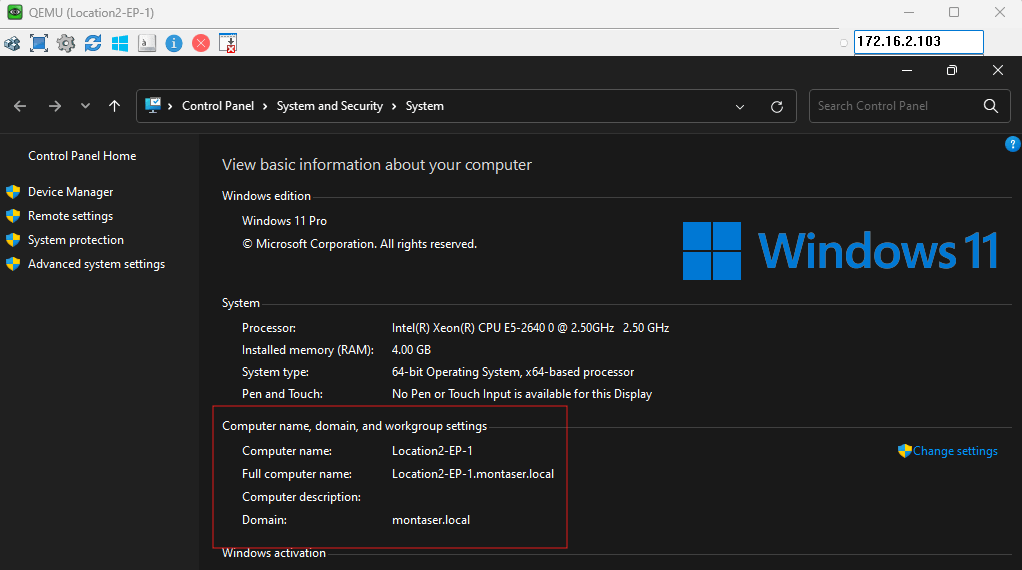
Under Computer name, Domain, and workgroup settings, you can confirm that Location2-EP-1 is joined to the montaser.local domain.
Overview of Active Directory Configuration
In this lab, Active Directory provides the certificate auto-enrollment and Group Policy services required for 802.1X authentication. The domain-joined machines receive the necessary supplicant configuration and trusted root CA through Group Policy, while certificate templates and auto-enrollment policies handle the provisioning of machine and user certificates for EAP-TLS authentication. The following sections focus on the specific Active Directory configurations used in this lab and how they support the authentication flow.
Note: This guide bypasses the deployment steps for certificate auto-enrollment and client supplicant provisioning, assuming these baseline services are already fully operational. Instead, the following key points are highlighted to outline exactly how the Active Directory infrastructure supports and interacts with our authentication flow inside this lab environment.
Users and User Groups:
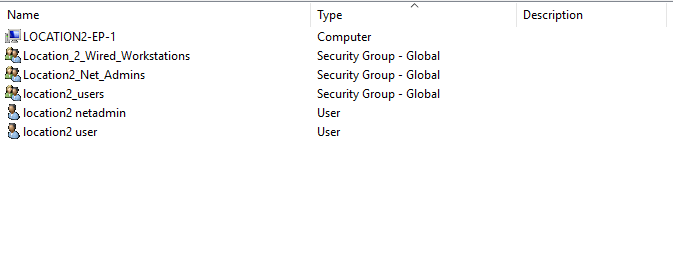
The lab environment includes the LOCATION2-EP-1 computer account, which represents the domain-joined endpoint used for 802.1X authentication. The Location_2_Wired_Workstations security group is used to manage workstation-specific settings, such as machine certificate auto-enrollment, and to restrict the Cisco ISE authentication policy to the intended endpoints. The Location2_Net_Admins and location2_users security groups, along with their respective user accounts, are created to test different authorization profiles in Cisco ISE. User certificate auto-enrollment is also configured to support the required authentication methods and demonstrate how Active Directory provisions user identities for network access.
GPOs:
Under Group Policy Management, a dedicated Organizational Unit (OU) named Location_2_Wired_Workstations is created within the montaser.local domain to manage the workstations used in this lab. The OU has three linked Group Policy Objects (GPOs): Certificate_Enrollment for certificate auto-enrollment, Endpoint-Net-Admins-GPO for the required endpoint settings, and WiredAuto-Config-PEAP-GPO for deploying the wired 802.1X supplicant configuration. This allows the required policies to be applied to workstations placed in the OU, rather than configuring each endpoint individually.
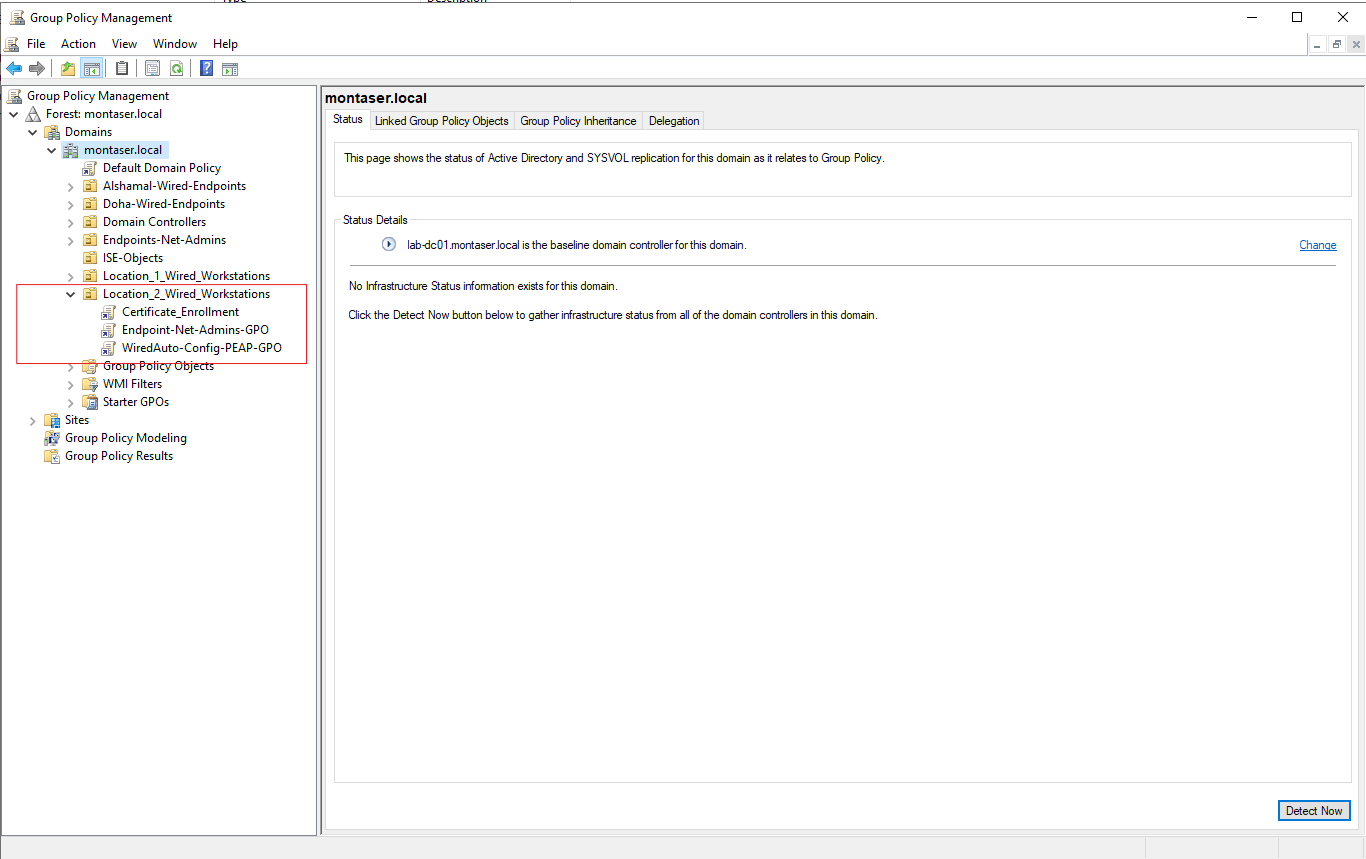
For Example, Check the WiredAuto-Config-PEAP-GPO configuration:
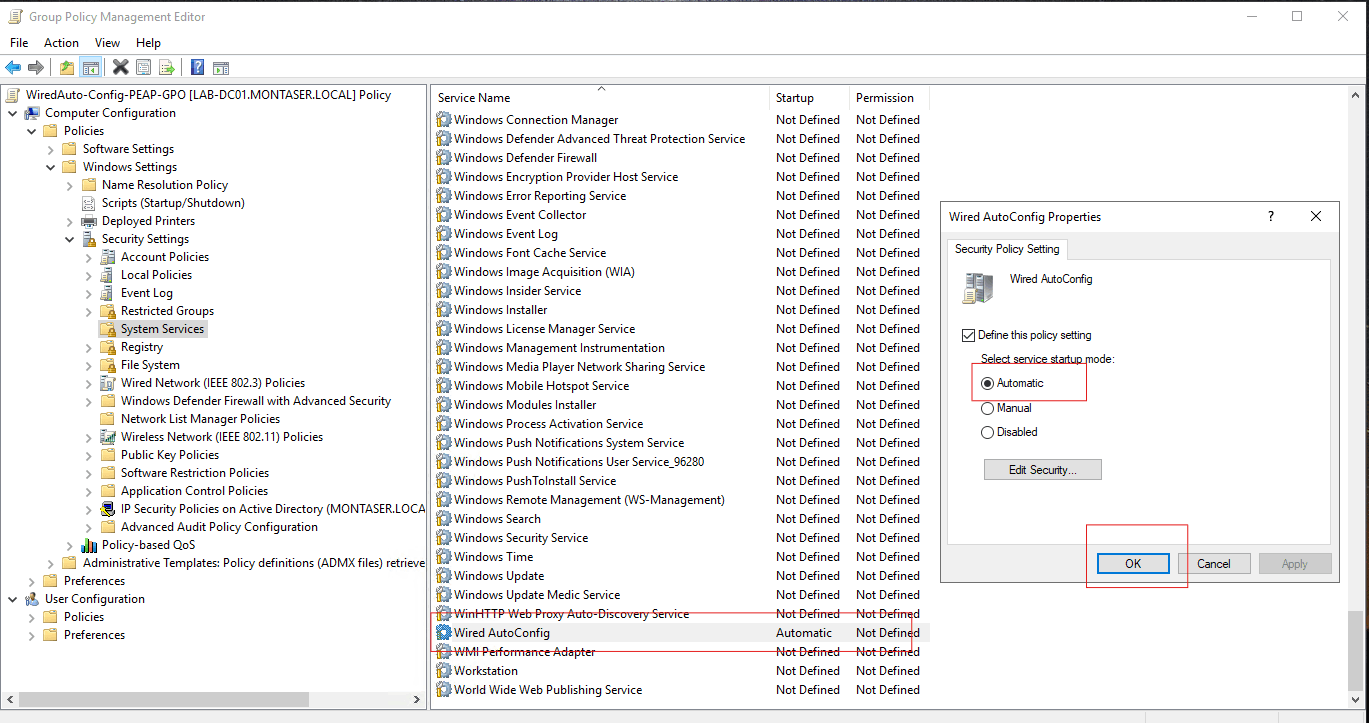
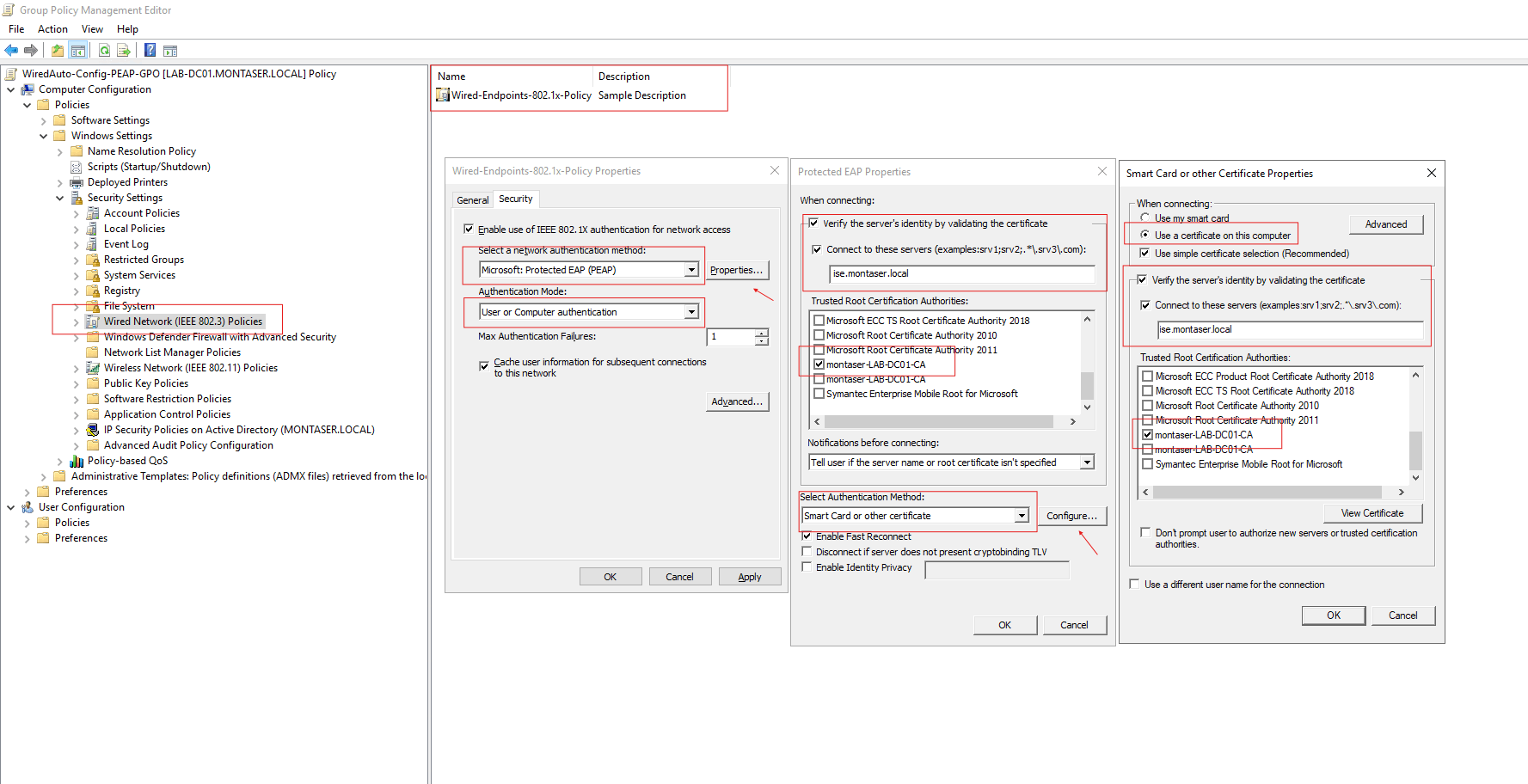
This GPO enables the Wired-AutoConfig service, which is the native Windows 802.1X supplicant, and pushes the PEAP and EAP-TLS configuration to all endpoints within the Location_2_Wired_Workstations OU.
Automatically enable 802.1x supplicant on domain-joined Endpints:
Automatically Configure 802.1x supplicant User and machine authentication using PEAP and EAP-TLS as inner method:
Certificate Templates:
Another aspect worth looking at is the certificate templates created for the automatic enrollment of user and machine certificates. Active Directory uses these templates to provision certificates for the users and computers in Location 2.
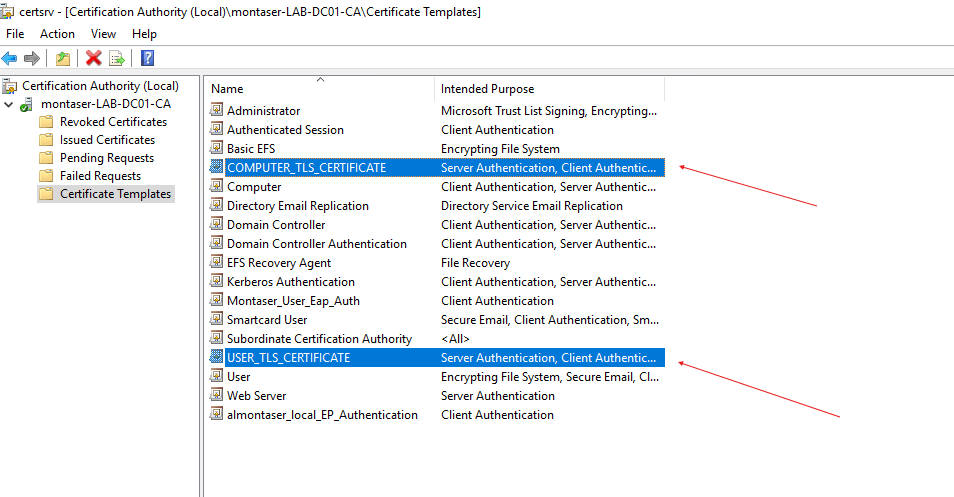
Automatic Client Configuration:
Once Active Directory is properly configured and the relevant policies are applied to domain-joined endpoints to provision client certificates and supplicant settings, you can see that users are automatically equipped with their user certificates, while the computer is provisioned with its machine certificate and supplicant configuration.
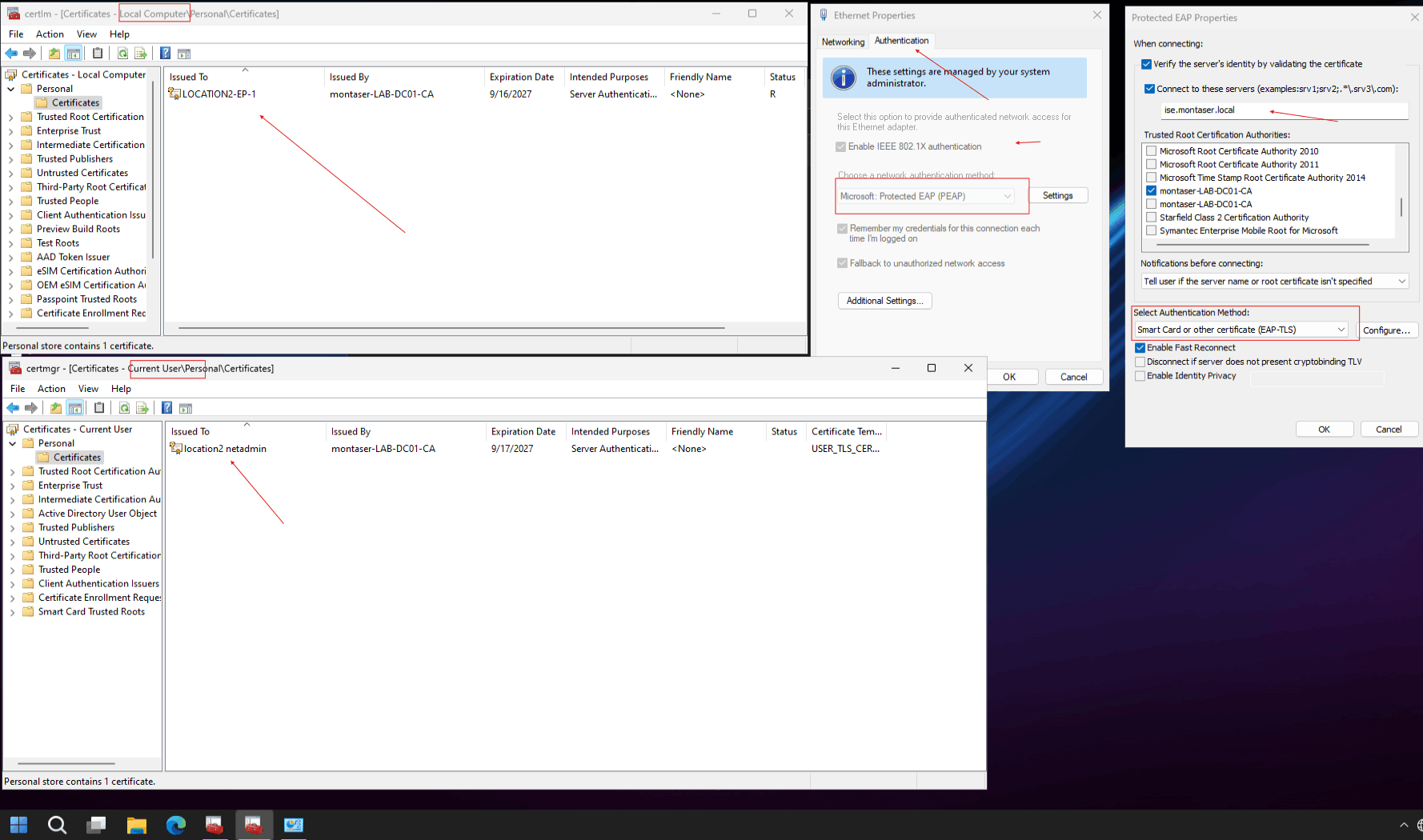
Check the issued User certificate details:
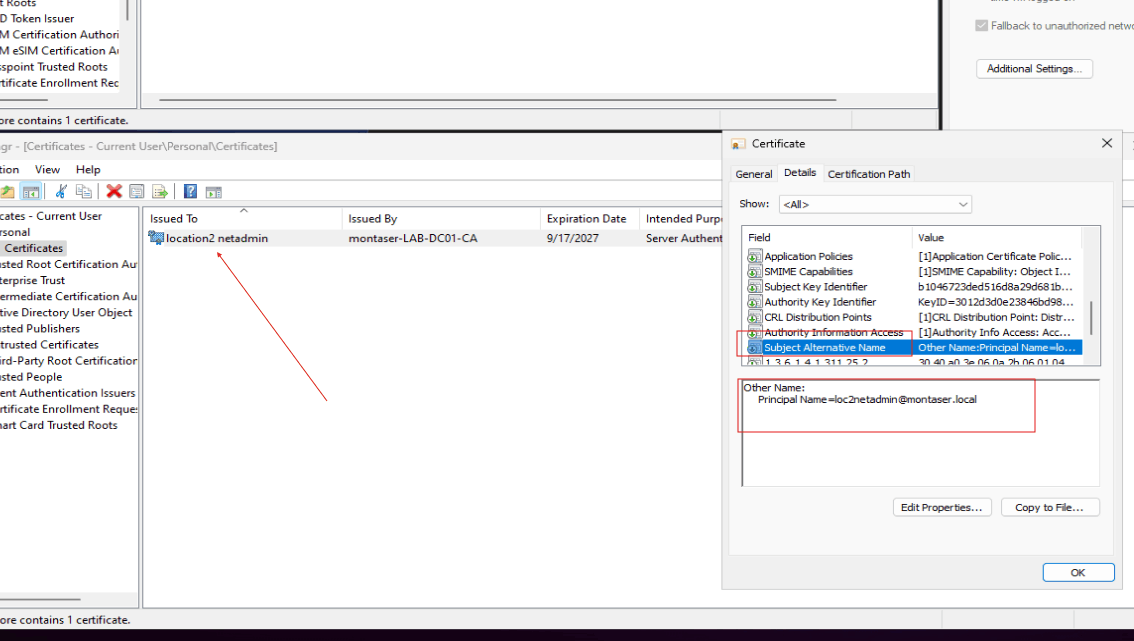
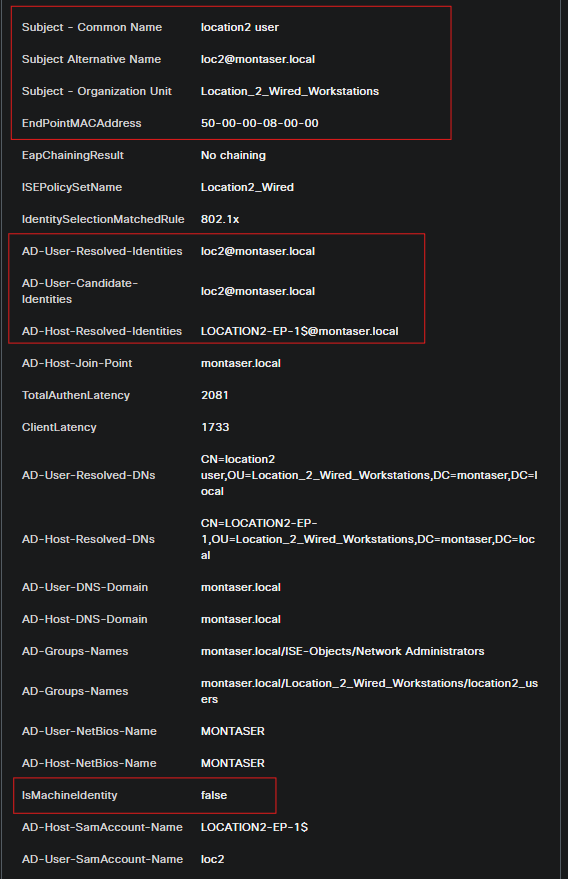
This section highlights an important detail that will affect the ISE configuration later. If you open the Location 2 NetAdmin certificate, you can see that the account username is embedded in the certificate’s Subject Alternative Name (SAN) field.
This is important because, later in the configuration, you will need to tell ISE which field within the certificate it should use to identify the user and perform the directory lookup. This is configured in the Certificate Authentication Profile (CAP), which will be explained in detail later in this article.
At this stage, you are ready to proceed with the configuration of the remaining entities: the authenticator, which in this lab is a Cisco virtual switch, and the authentication server, Cisco ISE.
Configure the Authenticator (Location2_Switch)
The configuration in this section is intentionally minimal, focusing only on the essential settings required to enable 802.1X authentication
AAA Global Configuration:
1
2
3
4
5
6
7
8
9
10
11
12
13
14
15
16
17
18
19
20
21
22
23
24
25
26
27
28
aaa new-model
aaa local authentication ISE-Auth authorization ISE-Authz


aaa authentication dot1x default group ISE-SG
aaa authorization network default group ISE-SG
aaa accounting dot1x default start-stop group ISE-SG

aaa group server radius ISE-SG
 server name ise.montaser.local
 deadtime 5

radius server ise.montaser.local
 address ipv4 172.16.2.101 auth-port 1812 acct-port 1813
 key *****

aaa server radius dynamic-author
 client 172.16.2.101 server-key *****

dot1x system-auth-control
aaa session-id common

interface Vlan100
 description RADIUS-L3
 ip address 10.1.100.3 255.255.255.0

ip route 172.16.0.0 255.255.0.0 10.1.100.1
Access Interface Configuration:
1
2
3
4
5
6
7
8
9
10
11
12
interface GigabitEthernet0/1
Description ### Location2-EP-1 ###
 switchport mode access
 negotiation auto
 authentication event fail action next-method
 authentication order dot1x mab
 authentication priority dot1x mab
 authentication port-control auto
 authentication periodic
 mab
 dot1x pae authenticator
 spanning-tree portfast edge
Configure The Authentication Server (ISE)
Adding Location2_Switch as a Network Device
Before ISE can process authentication requests from the access switch, the switch must be registered as a Network Device.
Navigate to:
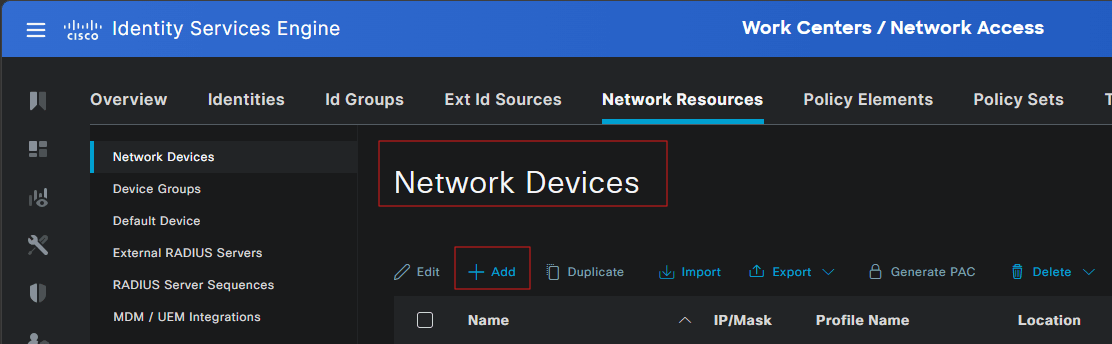
Administration > Network Resources > Network Devices
Click Add and enter the device details.
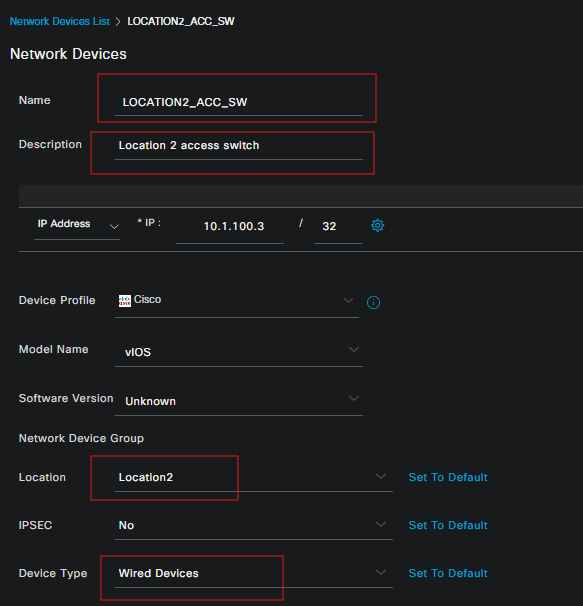
Configure the device parameters:
Configure the following device parameters:
- Name: Location2_Switch
- IP Address: The IP address used by the switch to communicate with ISE.
- Device Type: Select the appropriate network device type for your environment.
- Network Device Group: Assign the device to the relevant group if required.
Configure RADIUS parameters:
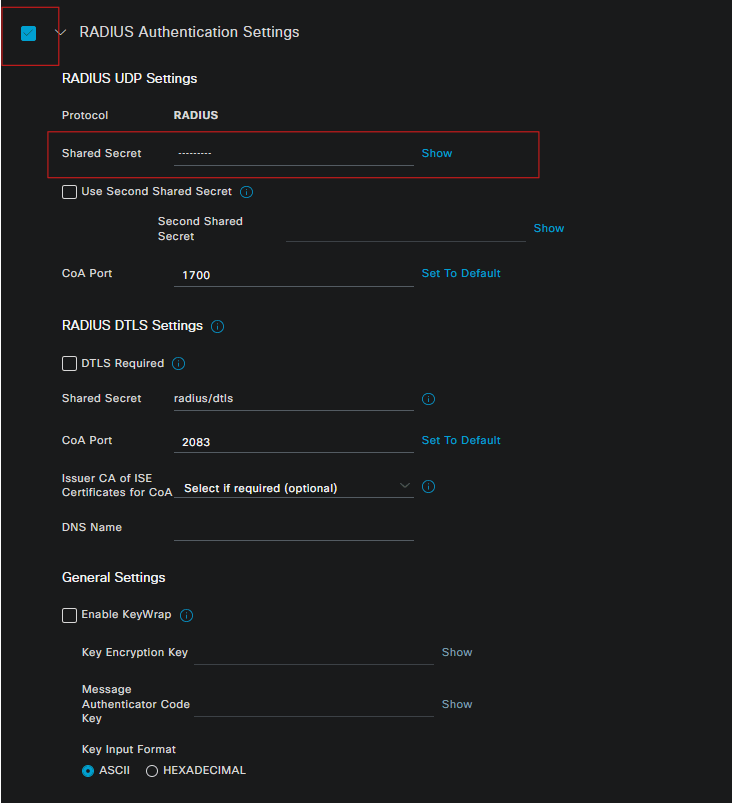
Enable RADIUS authentication and configure the shared secret.
The shared secret must match the key configured on the switch under the RADIUS server definition. In this lab, the switch uses ISE as its RADIUS server for authentication, authorization, and accounting.
Integrate with AD and Enable MAR
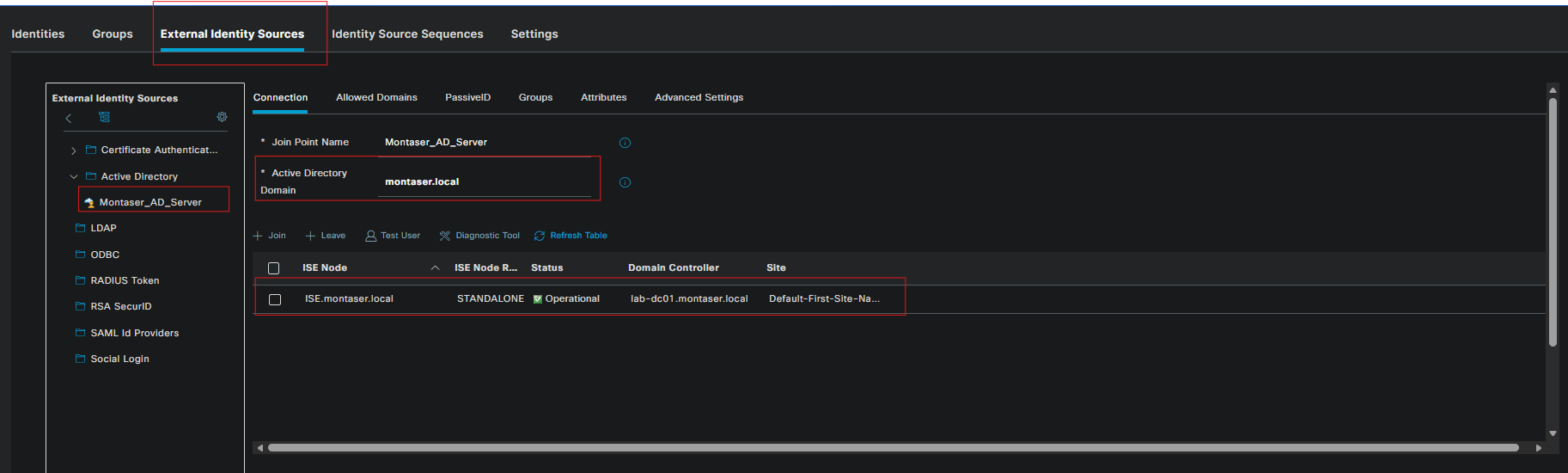
Cisco ISE uses Active Directory as the identity source for validating the credentials submitted by the Windows supplicant. In this lab, ISE is joined to the montaser.local Active Directory domain. This allows ISE to authenticate domain users and computer accounts through the configured AD integration.
Navigate to:Administration > Identity Management > External Identity Sources > Active Directory
Join ISE to the domain:
If ISE is not already joined to the domain, configure the Active Directory join point using the domain name and an account with sufficient permissions to join the ISE node to the domain. After joining the domain, verify that the connection is successful, then retrieve the required AD groups. In this lab, the Network Administrators and Corporate Users groups are imported into ISE.
Enable MAR:
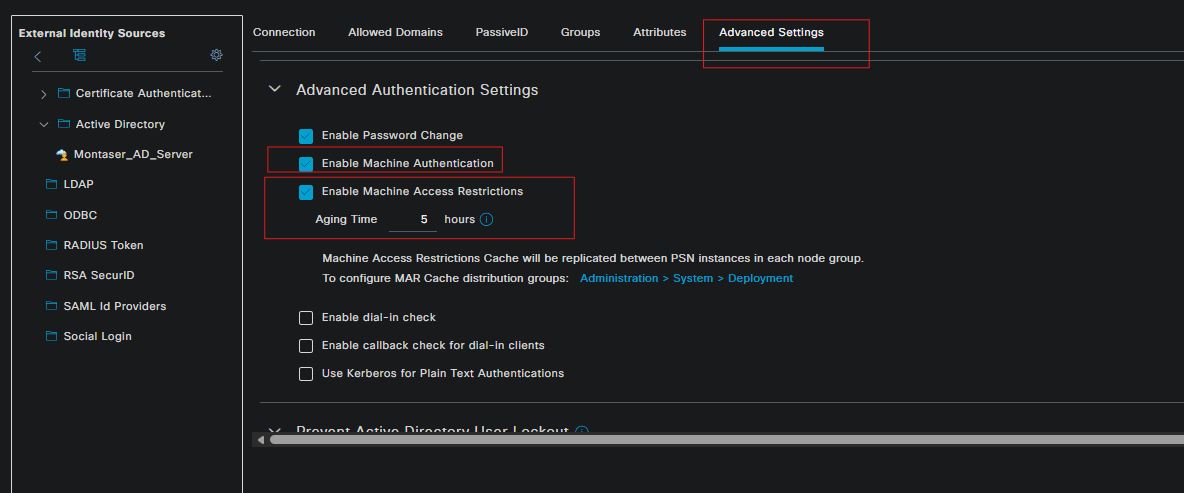
Machine Access Restriction (MAR) is used to support the traditional PEAP machine-before-user authentication workflow.
Enable the machine authentication and MAR options under the Active Directory join-point Advanced configuration.
The purpose of MAR is to allow ISE to determine whether a machine has previously authenticated successfully before authorizing a subsequent user authentication. This is important when the requirement is that a user must not receive normal network access unless the endpoint has already authenticated using its machine account.
The machine authentication and user authentication are separate PEAP authentication sessions. MAR allows ISE to correlate the machine authentication with the later user authentication for authorization purposes.
Note: MAR is a traditional mechanism used to support machine authentication with PEAP. Newer outer methods, such as TEAP, were developed to reduce dependency on MAR. TEAP uses a different authentication model and will be evaluated separately in a dedicated lab.
Create the certificate authentication profile:(CAP)
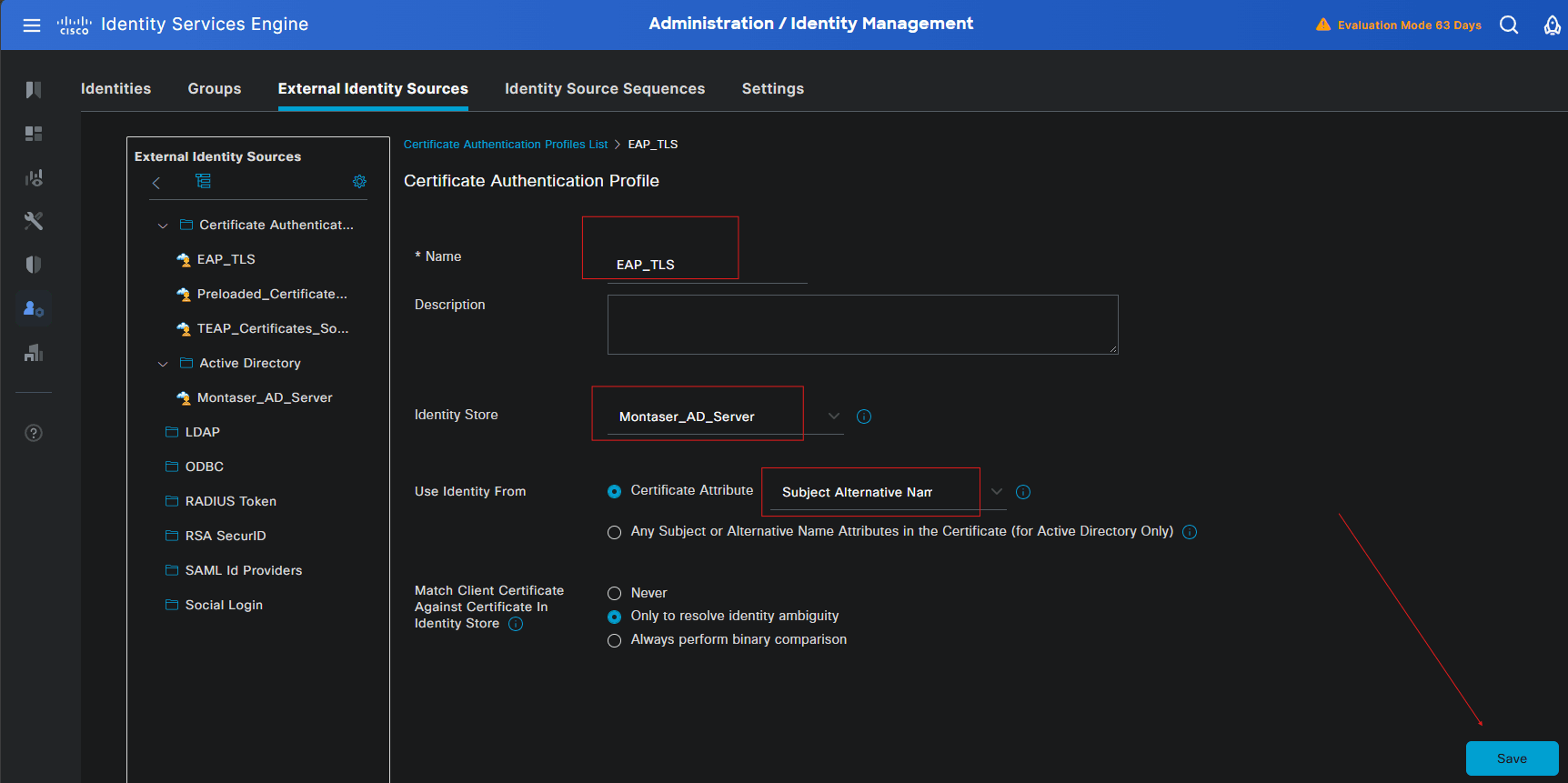
As mentioned earlier, ISE needs to know which field in the client certificate it should use to extract the user’s identity and perform the corresponding directory lookup. In this lab, the user’s account name is embedded in the Subject Alternative Name (SAN) field of the certificate.
To configure this, navigate to Administration > Identity Management > External Identity Sources > Certificate Authentication Profile and click Add to create a new Certificate Authentication Profile.
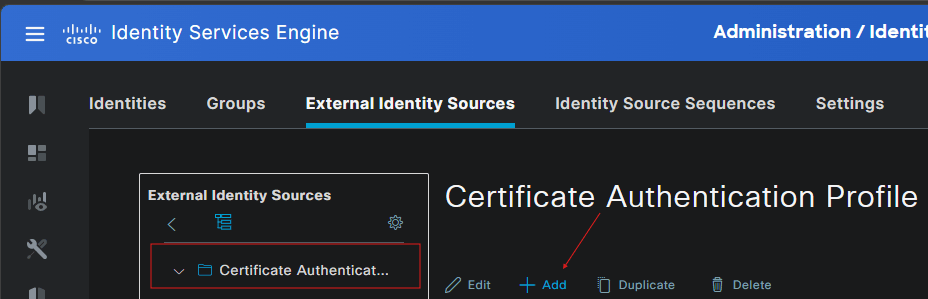
Give the profile a descriptive name, such as EAP-TLS. Under Principal Name X509 Attribute, select Subject Alternative Name and specify the appropriate SAN attribute that contains the user’s account name.
Finally, enable Resolve Identity Ambiguity so that ISE can use the extracted identity to resolve the corresponding user account.
You have trust Issues:
At this point, it is important to distinguish between the two sides of trust involved in EAP-TLS. The ISE server certificate is presented by ISE to the Windows endpoint, while the client certificate is presented by the endpoint to ISE. Each side therefore needs to trust the CA that issued the certificate presented by the other side(hence the trust issues). In this lab, the same Root CA is used to sign both certificates, but the trust relationships serve different purposes.
1
2
3
4
5
6
7
8
9
10
11
12
                    Your Root CA
                   /            \
                  /              \
                 ▼                ▼
       ISE EAP Server Cert     User/Machine Cert
              │                       │
              │                       │
              ▼                       ▼
       Presented by ISE        Presented by endpoint
              │                       │
              ▼                       ▼
       Windows trusts CA         ISE trusts CA
EAP-TLS Server Certificate:
The EAP-TLS server certificate identifies ISE to the endpoint during the TLS negotiation. When the Windows native supplicant connects to ISE using EAP-TLS, ISE presents this certificate to the endpoint, allowing Windows to verify the identity of the authentication server.
In this lab, the CA that issued the ISE EAP-TLS certificate was already included in the trusted CA configuration deployed to the Windows endpoints through the GPOs configured earlier. As a result, the native Windows supplicant can validate the certificate presented by ISE without requiring manual certificate configuration on each workstation.
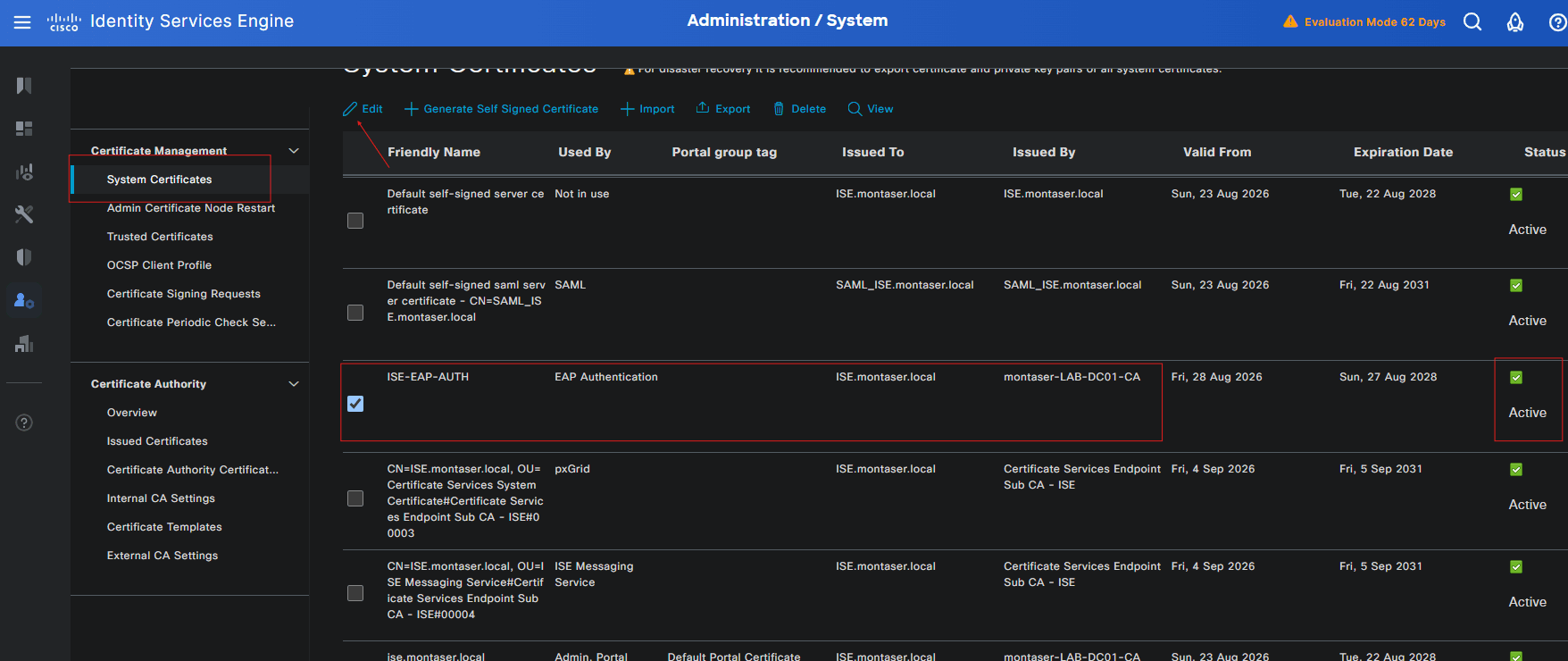
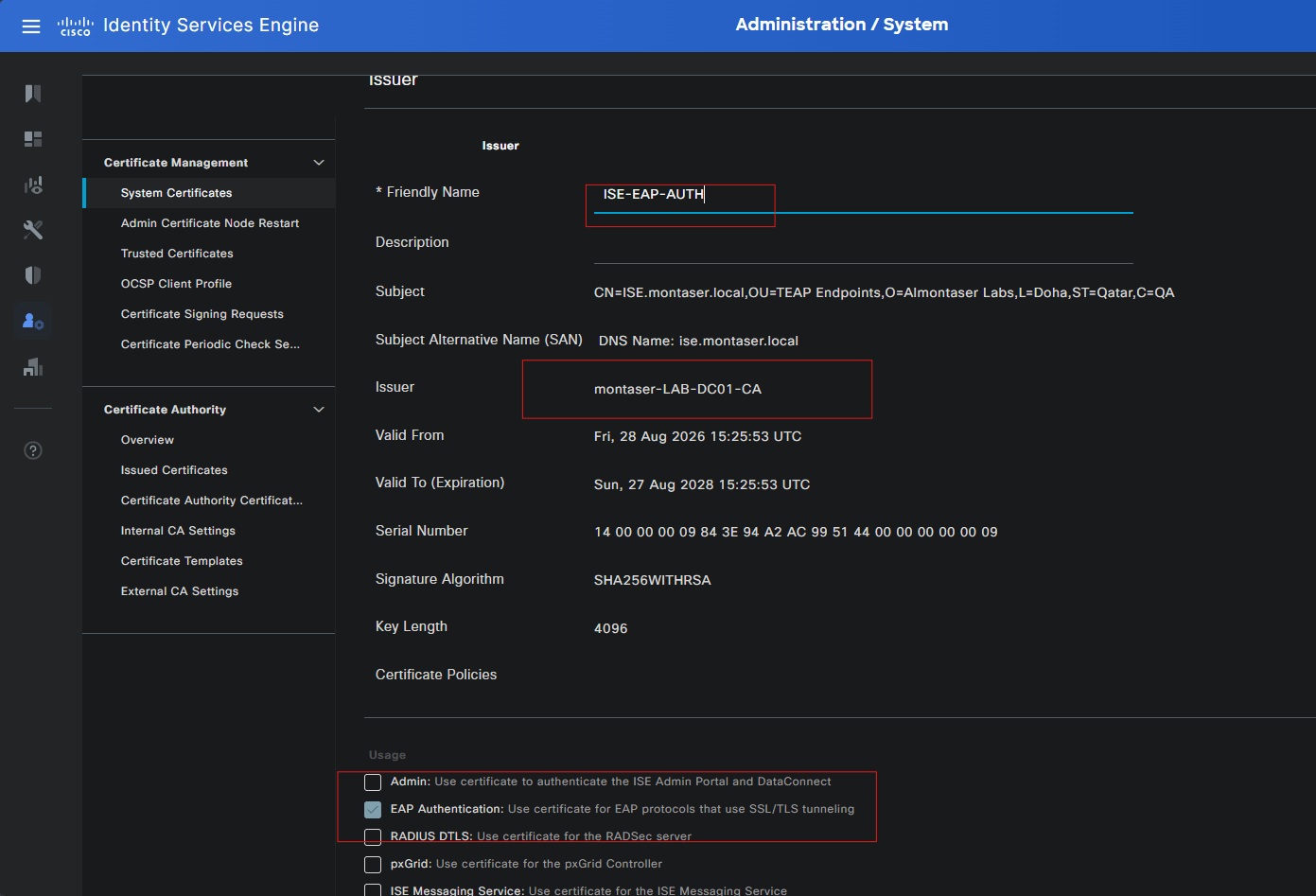
Note: It is recommended to use a dedicated certificate for EAP authentication, separate from the certificates used for ISE administration and portals. In this lab, the EAP-TLS authentication certificate was generated from an ISE-generated CSR and then signed by the
montaser.localdomain CA before being imported into ISE.
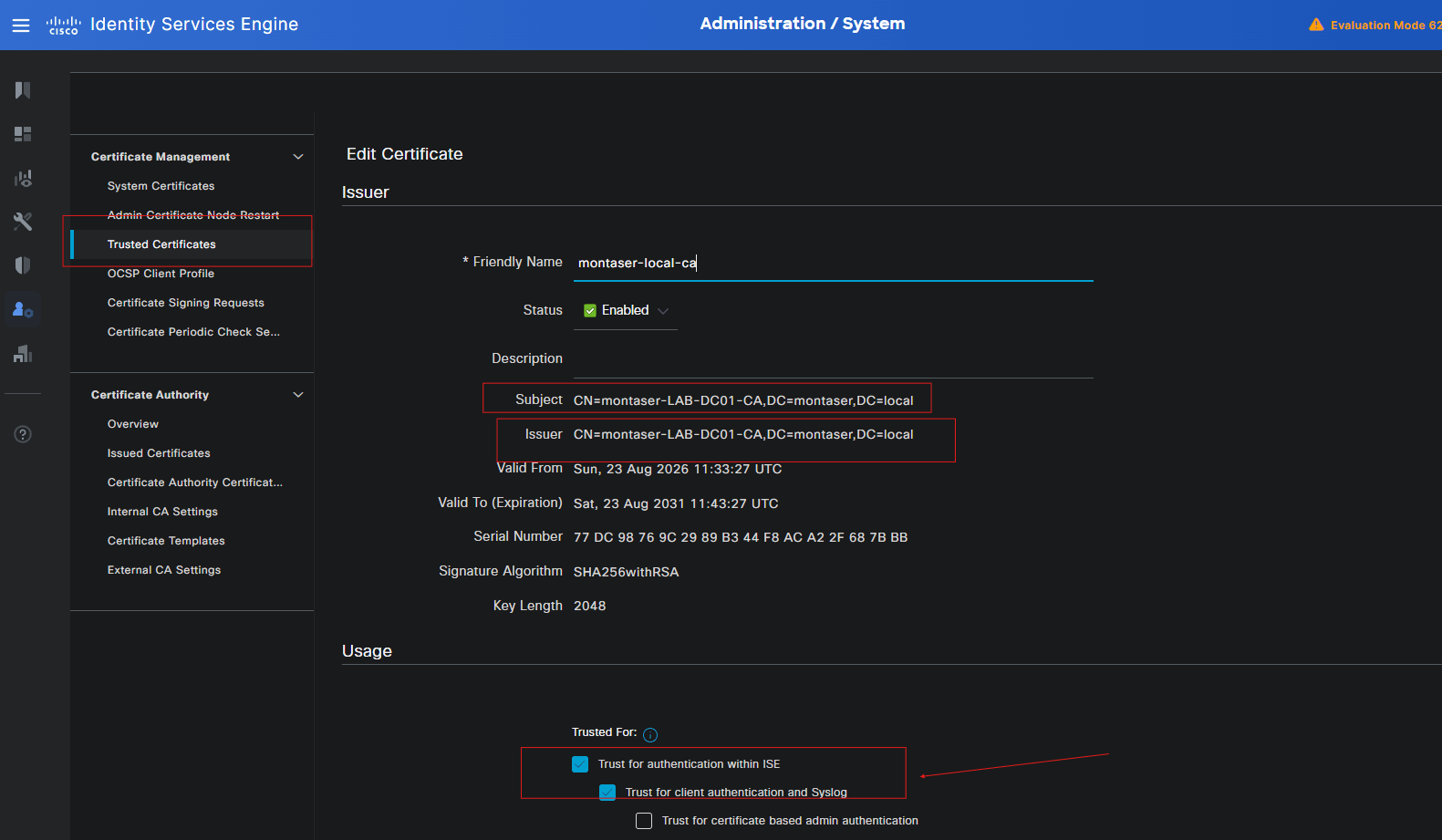
Trust the Client Certificate CA:
Before ISE can authenticate the client certificates presented during EAP-TLS, it must trust the Certificate Authority (CA) that issued those certificates. To establish this trust, import the CA certificate into ISE’s Trusted Certificates store and enable the Trust for client authentication and Syslog usage. This tells ISE that certificates issued by this CA can be trusted for endpoint authentication through EAP.
Configure the Policy Set
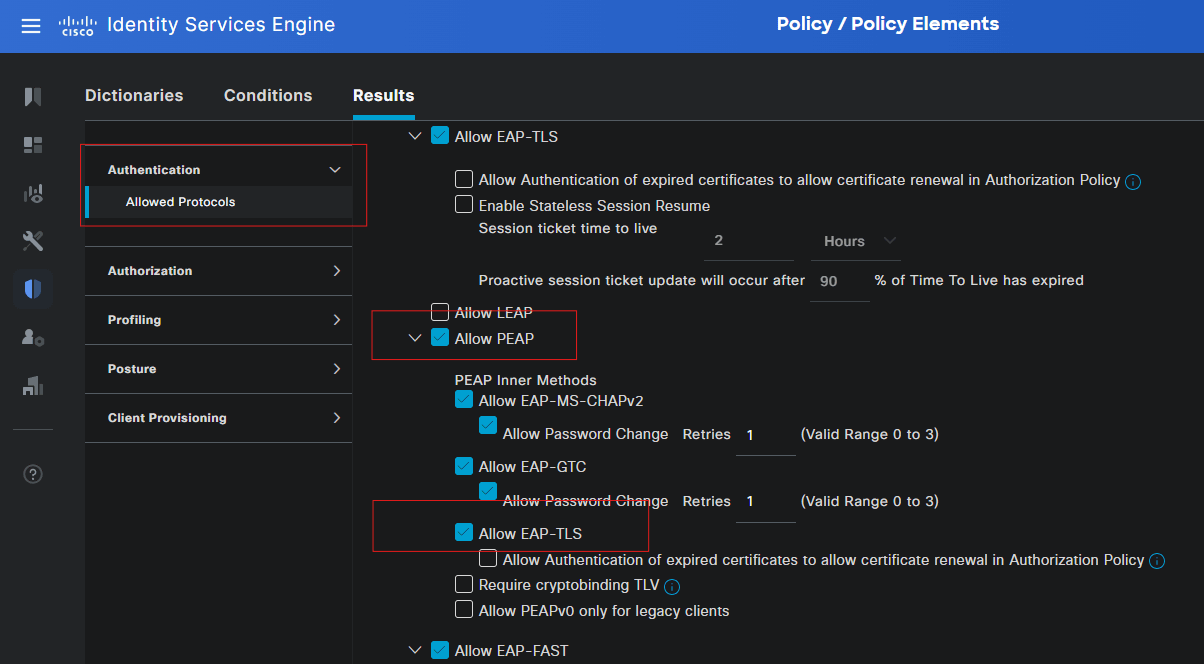
Note: Navigate to Policy > Policy Elements > Results > Allowed Protocols, open Default Network Access, and make sure EAP-TLS is enabled.
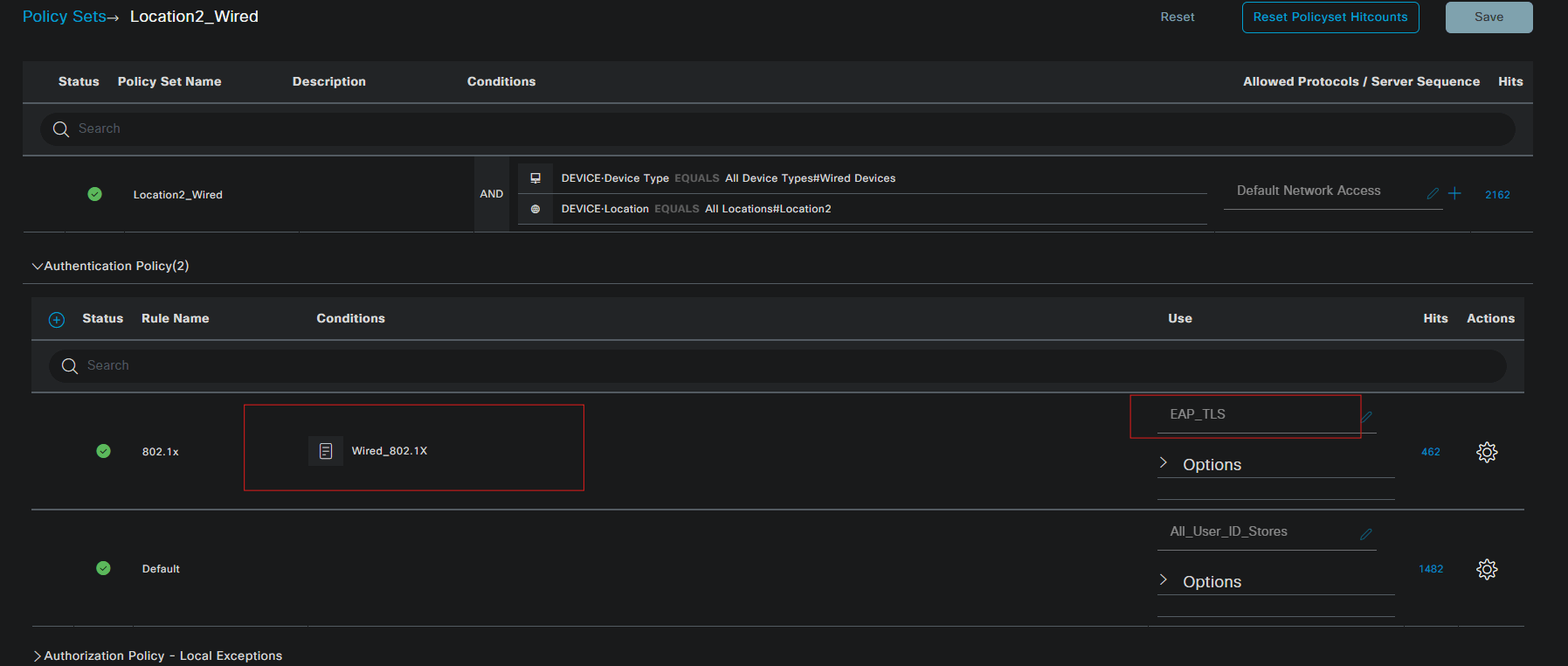
Create a dedicated policy set for the Location 2 wired endpoints to handle their 802.1X authentication and authorization.
- Condition: network device group containing device type
Wired Devicesand Device locationLocaction2.

Configure Authentication Rule:
Open the policy set you created, under the Authentication Policy Select preconfigured condition Wired 802.1x, and select the Certificate Authentication Profile (CAP) you created (EAP-TLS) as the identity source. This allows ISE to use the identity extracted from the client certificate during EAP-TLS authentication.
Configure Authorization Rules:
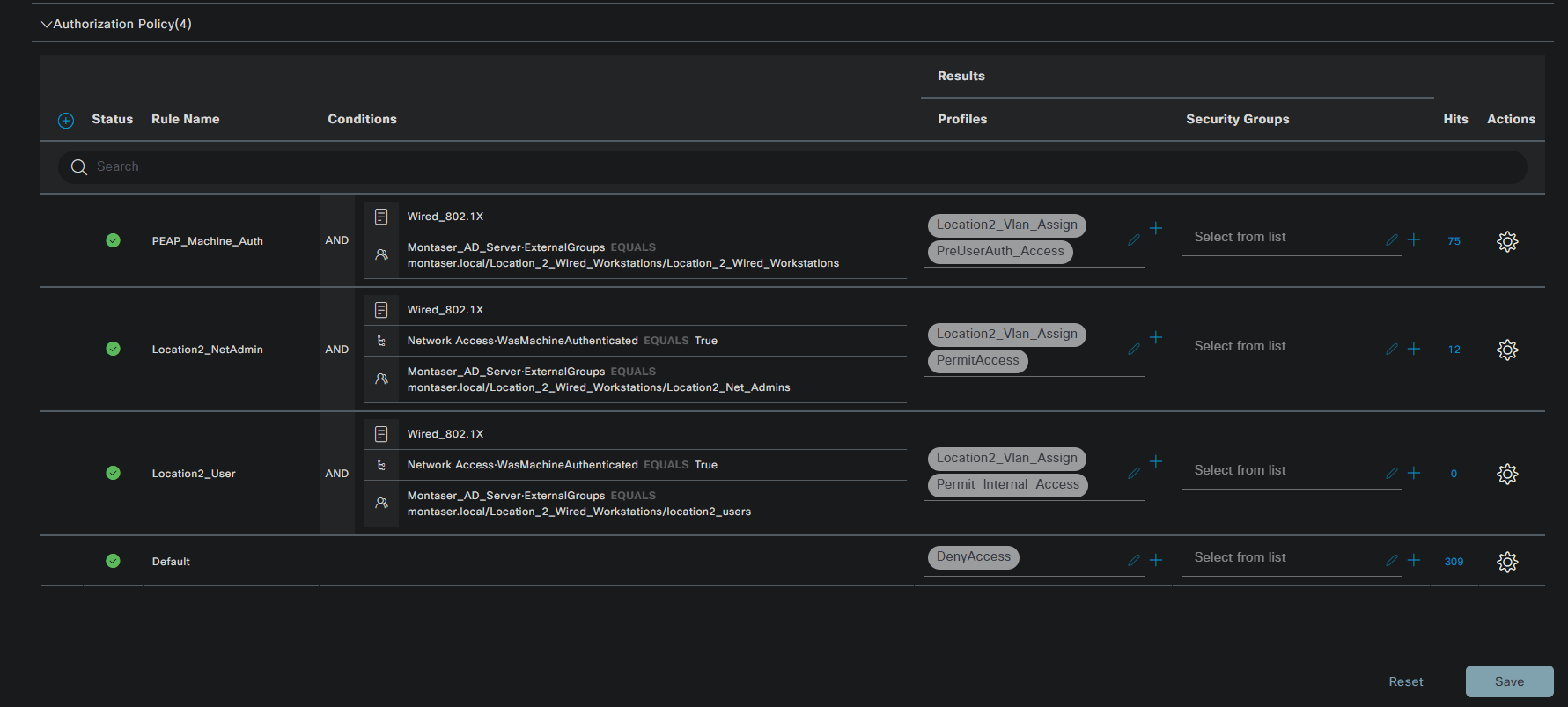
The authorization policy determines what authenticated endpoints are allowed to access after authentication succeeds. In this lab, the policy distinguishes between machine authentication, Location 2 NetAdmin users, and regular Location 2 users.
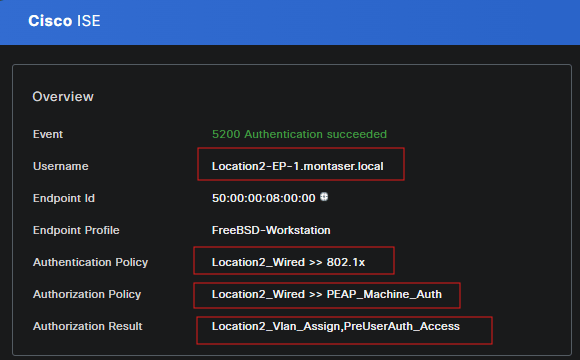
The PEAP_Machine_Auth rule handles the initial machine authentication and returns the PreUserAuth_Access profile which applies a dACL that permits DHCP and DNS traffic only.
The Location2_NetAdmin rule requires successful machine authentication and membership in the Location2_Net_Admins AD group, granting PermitAccess or Full access.
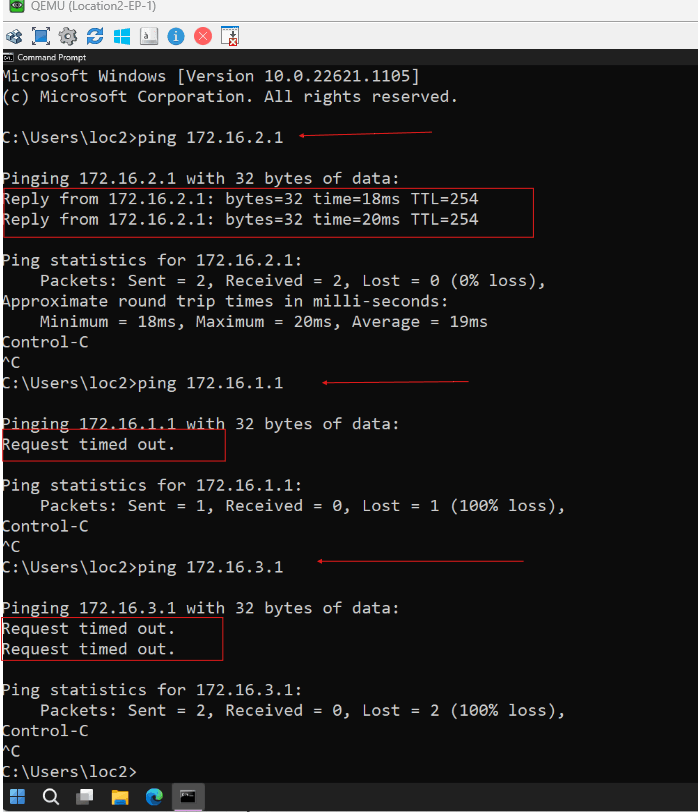
The Location2_User rule similarly requires prior machine authentication but matches members of the location2_users group and returns Permit_Internal_Access which applies a dACL to permit traffic to 172.16.2.0/24 network only.
Any request that does not match these conditions falls through to the Default rule and receives DenyAccess
Authentication and Authorization Testing
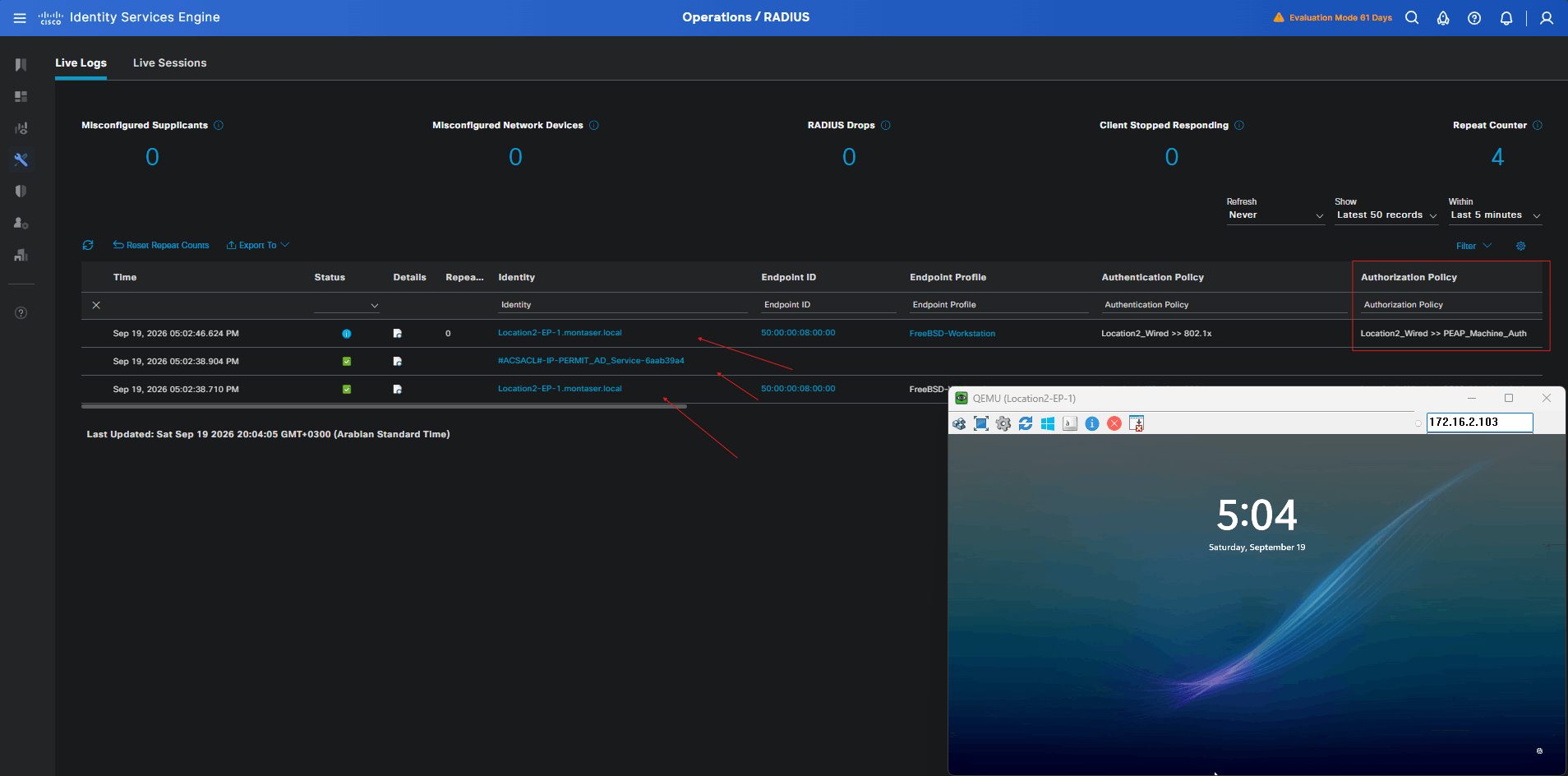
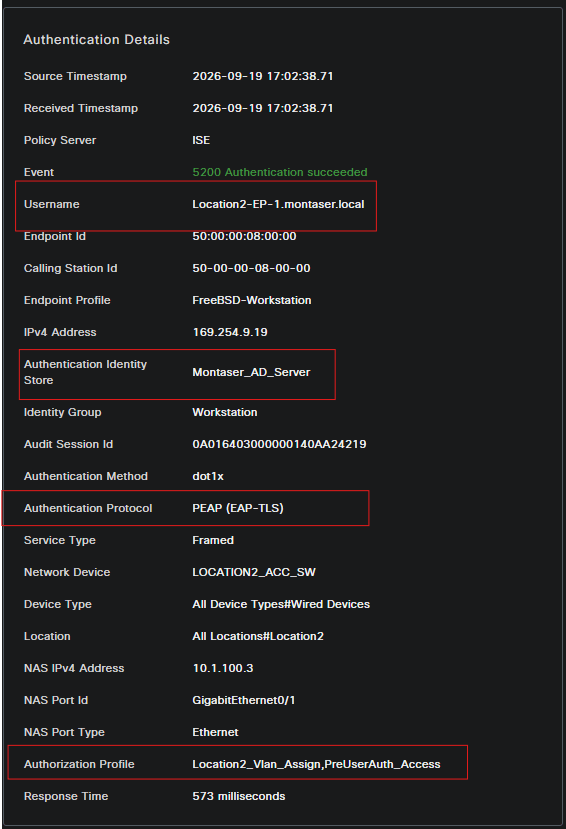
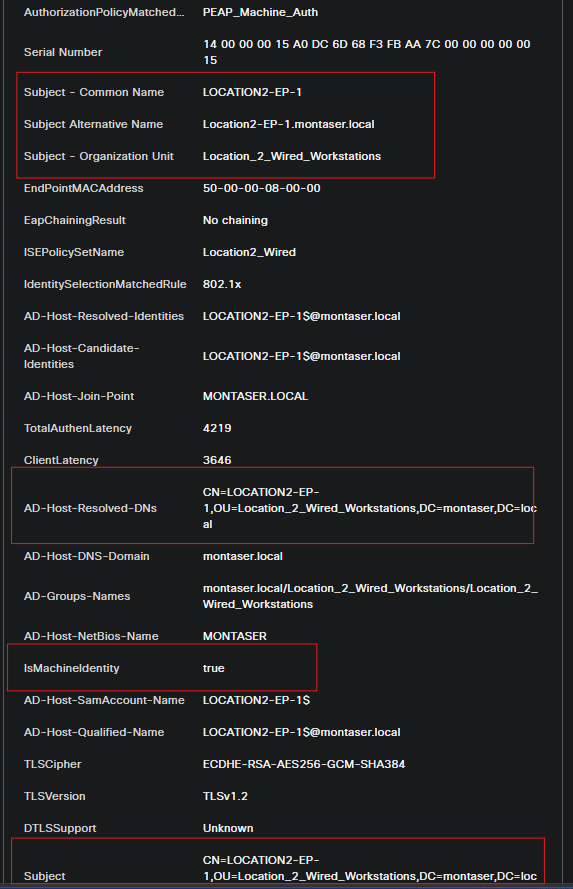
This section puts the configuration built throughout this lab through an end-to-end validation. The testing starts with Location2-EP-1 performing machine authentication using EAP-TLS, after which ISE grants the pre-user access required for essential services such as DHCP and DNS.
Once the machine has successfully authenticated, the user authentication process can take place using EAP-TLS as well. A standard Location 2 user is authorized according to the Location2_users AD group and is restricted to resources within the 172.16.2.0/24 subnet, while a Location 2 network administrator receives full network access based on membership in the Location2_Aet_Admins AD group.
Throughout these tests, a successful machine authentication must already exist before user access is granted. This also provides an opportunity to observe how ISE validates the Machine Authentication condition used in the authorization policies through MAR (Machine Access Restriction).
1. Powering Up Location2-EP-1:
Power on Location2-EP-1 and allow Windows to complete its startup process. Before the user login screen is presented, the endpoint should perform machine authentication using its EAP-TLS certificate.
1
2
3
4
5
6
7
8
9
10
11
12
13
14
15
16
17
18
19
20
21
22
23
24
25
26
27
28
29
30
31
32
33
            Interface:  GigabitEthernet0/1
          MAC Address:  5000.0008.0000
         IPv6 Address:  Unknown
         IPv4 Address:  10.1.2.27
            User-Name:  Location2-EP-1.montaser.local
               Status:  Authorized
               Domain:  DATA
       Oper host mode:  single-host
     Oper control dir:  both
      Session timeout:  3600s (local), Remaining: 3373s
       Timeout action:  Reauthenticate
      Restart timeout:  N/A
Periodic Acct timeout:  N/A
       Session Uptime:  234s
    Common Session ID:  0A016403000000150AA6DBCD
      Acct Session ID:  0x0000000C
               Handle:  0xF1000008
       Current Policy:  POLICY_Gi0/1

Local Policies:
        Service Template: DEFAULT_LINKSEC_POLICY_SHOULD_SECURE (priority 150)
      Security Policy:  Should Secure
      Security Status:  Link Unsecure


Server Policies:
           Vlan Group:  Vlan: 20
              ACS ACL:  xACSACLx-IP-PERMIT_AD_Service-6aab39a4

Method status list:
      Method            State

      dot1x              Authc Success
2. Login Using Location 2 Standard User:
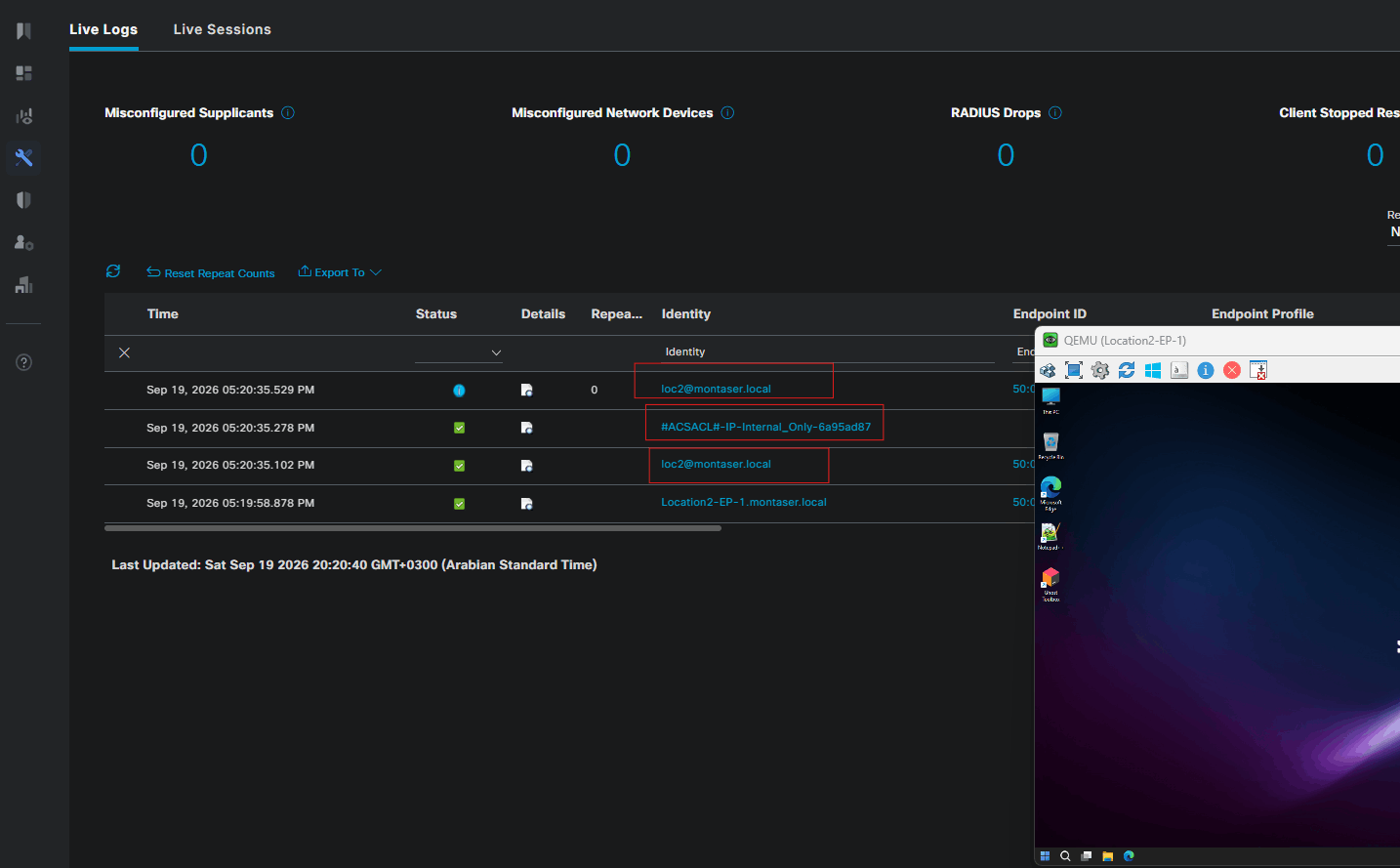
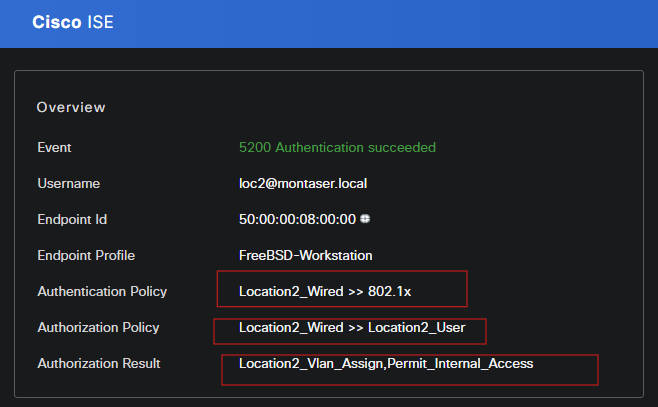
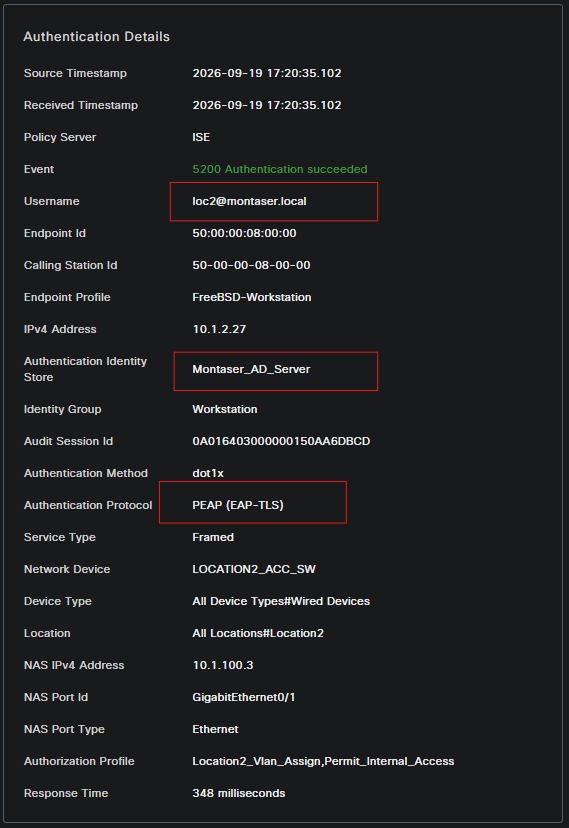
Log in to Location2-EP-1 using a standard Location 2 user account. The user authentication is performed using EAP-TLS, and ISE evaluates the user’s AD group membership together with the previously established machine authentication state.

1
2
3
4
5
6
7
8
9
10
11
12
13
14
15
16
17
18
19
20
21
22
23
24
25
26
27
28
29
30
31
32
33
34
35

            Interface:  GigabitEthernet0/1
          MAC Address:  5000.0008.0000
         IPv6 Address:  Unknown
         IPv4 Address:  169.254.9.19
            User-Name:  loc2@montaser.local
               Status:  Authorized
               Domain:  DATA
       Oper host mode:  single-host
     Oper control dir:  both
      Session timeout:  3600s (local), Remaining: 3263s
       Timeout action:  Reauthenticate
      Restart timeout:  N/A
Periodic Acct timeout:  N/A
       Session Uptime:  1088s
    Common Session ID:  0A016403000000150AA6DBCD
      Acct Session ID:  0x0000000F
               Handle:  0xF1000008
       Current Policy:  POLICY_Gi0/1

Local Policies:
        Service Template: DEFAULT_LINKSEC_POLICY_SHOULD_SECURE (priority 150)
      Security Policy:  Should Secure
      Security Status:  Link Unsecure


Server Policies:
           Vlan Group:  Vlan: 20
              ACS ACL:  xACSACLx-IP-Internal_Only-6a95ad87

Method status list:
      Method            State

      dot1x              Authc Success
Because the user belongs to the Location2_users group, ISE should return the corresponding authorization result, allowing the endpoint to communicate with resources within the 172.16.2.0/24 subnet.
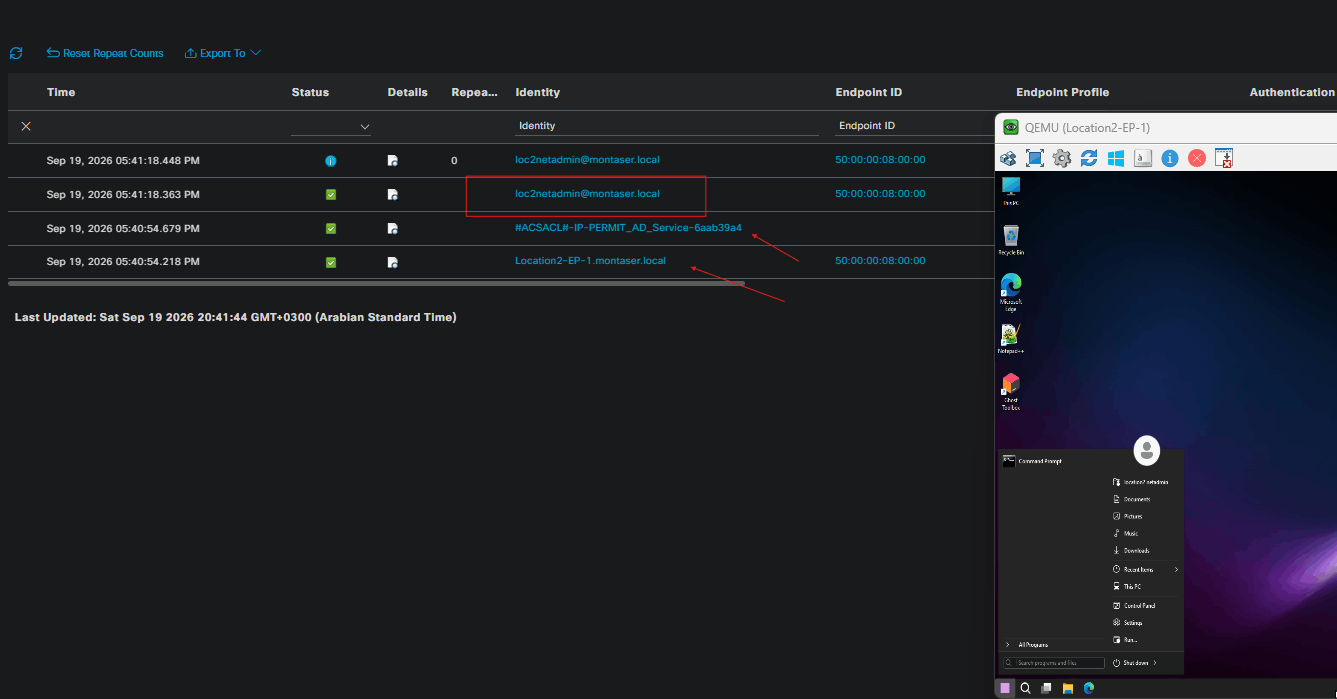
3. Login Using Location 2 Network Administrator:
Log out of the current session and log in using a Location 2 network administrator account. The user is again authenticated using EAP-TLS, while ISE validates the user’s membership in the Network Administrators AD group.
1
2
3
4
5
6
7
8
9
10
11
12
13
14
15
16
17
18
19
20
21
22
23
24
25
26
27
28
29
30
31
32
33
34
            Interface:  GigabitEthernet0/1
          MAC Address:  5000.0008.0000
         IPv6 Address:  Unknown
         IPv4 Address:  10.1.2.27
            User-Name:  loc2netadmin@montaser.local
               Status:  Authorized
               Domain:  DATA
       Oper host mode:  single-host
     Oper control dir:  both
      Session timeout:  3600s (local), Remaining: 3337s
       Timeout action:  Reauthenticate
      Restart timeout:  N/A
Periodic Acct timeout:  N/A
       Session Uptime:  2231s
    Common Session ID:  0A016403000000150AA6DBCD
      Acct Session ID:  0x00000013
               Handle:  0xF1000008
       Current Policy:  POLICY_Gi0/1

Local Policies:
        Service Template: DEFAULT_LINKSEC_POLICY_SHOULD_SECURE (priority 150)
      Security Policy:  Should Secure
      Security Status:  Link Unsecure


Server Policies:
           Vlan Group:  Vlan: 20

Method status list:
      Method            State

      dot1x              Authc Success
Provided that the required machine authentication is already present, ISE should authorize the session with the administrator access policy, granting the user full network access.
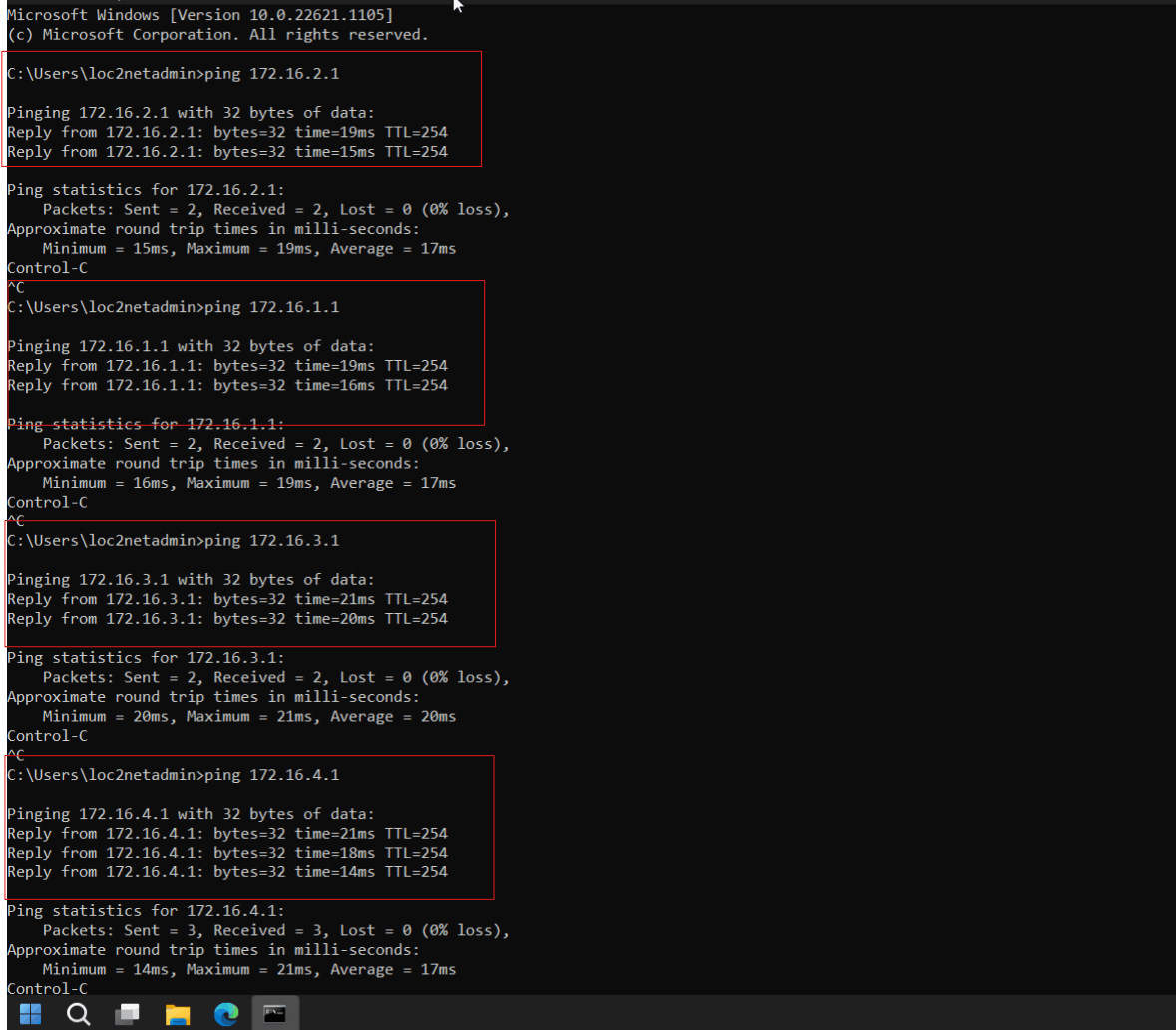
Conclusion
This lab demonstrated how Cisco ISE can provide a complete wired network access control solution using EAP-TLS for both machine and user authentication. By replacing username-and-password-based authentication with certificate-based authentication, the deployment removes the need to rely on passwords during the network access process and instead requires the endpoint and user to present valid certificates issued by a trusted authority.
The configuration also demonstrated how authentication and authorization can be separated. After successful machine authentication, ISE grants the endpoint the limited access required for essential services such as DHCP and DNS. Once the user authenticates, ISE evaluates the user’s identity and Active Directory group membership to determine the appropriate level of network access. Standard Location 2 users are restricted to the 172.16.2.0/24 network, while members of the Network Administrators group receive full network access.
However, MAR should not be considered the preferred long-term mechanism for enforcing machine-and-user authentication relationships. It relies on ISE associating a subsequent user authentication with a previously successful machine authentication, which introduces operational considerations around session state, timing, reauthentication, and endpoint behavior. For environments requiring a stronger and more explicit binding between machine and user identities, EAP-TEAP with appropriate inner-method configuration provides a more purpose-built approach for carrying out machine and user authentication within the same EAP conversation.
Overall, this lab establishes a certificate-based foundation for wired access control while also demonstrating both the capabilities and the limitations of using MAR as the mechanism for enforcing machine-before-user authentication.